About interpreted mode (dev-i)
Piko has three run modes, dev, dev-i, and prod. The two development modes reload templates after an edit. Production runs compiled Go without development machinery. Interpreted mode (dev-i) removes the server rebuild from the template editing loop.
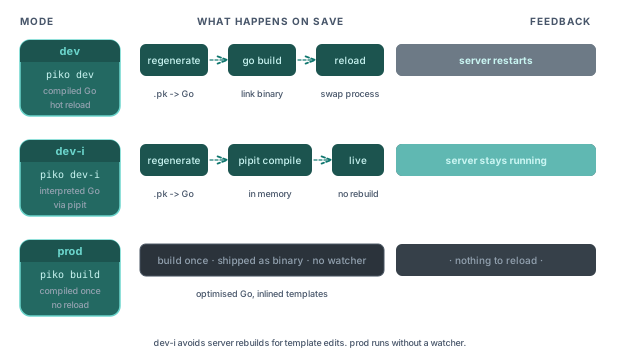
The three modes in one line
| Mode | Flag | Template engine | Hot reload | Who uses it |
|---|---|---|---|---|
| Dev | piko dev or RunModeDev | Compiled Go (regenerated on file change) | Yes | Default development |
| Dev interpreted | piko dev-i or RunModeDevInterpreted | Generated Go, interpreted by Pipit | Yes | Faster iteration for PK template changes |
| Production | piko build then ./bin/app prod, or RunModeProd | Compiled Go, optimised | No | Shipping |
What dev-i changes
In dev mode, a .pk edit triggers regeneration and a rebuild of the Go binary. The feedback loop detects the change, regenerates Go, rebuilds the binary, and reloads the server. Its duration depends on the project and build environment.
In dev-i mode, template edits do not rebuild the server binary. Piko runs the generated code through Pipit, a Go bytecode interpreter. On each edit, the generator produces Go source and Pipit compiles it to bytecode in memory. The server then loads the updated templates without restarting.
Both modes use the same generated Go source. They differ in how they execute it, so interpreter support and available native symbols also affect what can run in dev-i.
What you trade for the faster loop
Interpreted execution adds runtime overhead compared with compiled Go. The shorter rebuild cycle can help with template editing, but rendering performance in dev-i does not represent production performance.
Pipit supplies native symbol tables for the standard library, and Piko adds its runtime packages. Piko can compile local project packages from source or use registered native symbols. Third-party Go packages need native symbol tables. The runtime symbols reference describes the available packages.
Native symbols belong to the server binary. Changes to those packages require a rebuild and restart, even in interpreted mode. This makes the distinction between template edits and native package edits relevant when choosing a development workflow.
When to use each mode
Use dev when:
- Measuring rendering performance locally.
- Debugging an issue that only surfaces under compiled-code conditions (rare but happens).
- Working on Piko itself, where you want to test generator changes.
Use dev-i when:
- Iterating on templates and UI without restarting the server.
- Working on a large project where the compiled rebuild is noticeable.
- Demonstrating template changes where rebuild time interrupts the flow.
Use prod when:
- Benchmarking production performance.
- Running integration tests that approximate production behaviour.
- Shipping.
How the interpreter integrates with the generator
The generator emits Go source for each template in every run mode. In dev and prod, the Go toolchain compiles that source into the binary. In dev-i, Pipit compiles it to bytecode at runtime and runs the package initialisation functions that register template builders.
Each project has a generator entry point at cmd/generator/main.go. The output tree stays the same across run modes. The difference lies in when compilation happens and which runtime executes the generated code.
See also
- How to run interpreted mode for setup, native symbols, and bytecode inspection.
- Interpreter API reference for resource limits and diagnostic output.
- CLI reference for
piko dev,piko dev-i,piko extract, and the per-project generator scaffolded into your own tree (typically run asgo run ./cmd/generator/main.go all). - Runtime symbols reference for what the interpreter can see.
- Bootstrap options reference for
WithInterpreterProvider. - Integration tests:
tests/integration/interpreted_runnerandinterpreted_cache_invalidation.