Core concepts
A Piko developer carries a short mental model. Pages render on the server. Components render on the client. Actions are the typed RPC in between. Collections turn content files into routes. Services plug into the application through interfaces. Everything compiles, and everything the compiler sees is a Go type.
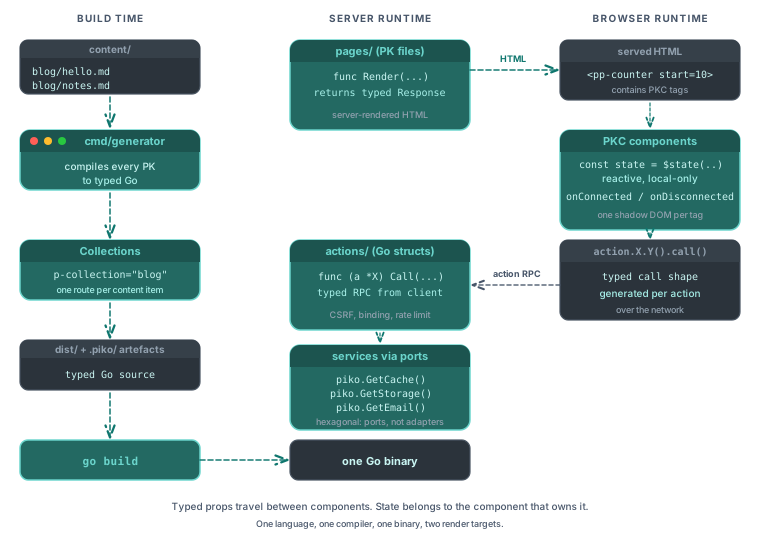
This page traces each of those ideas and how they interlock. Individual pieces have their own explanation pages. This page is the overview.
One language, one compiler, one binary
Piko is a website development kit for Go. The server is Go, the template logic is Go, the build is go build. A Piko project ships as a single binary that contains the HTTP server, the compiled templates, the actions, and the assets. There is no second process, no adjacent Node runtime, no serialised API boundary between the render and the backend.
This is the load-bearing choice. Every other decision compounds on top of it. Types flow end-to-end because the types are Go types. Renaming a field is a compiler error because the template compiler has seen the struct. The cost is that everyone who touches the project writes Go, including the bits that feel like frontend work. The payoff is that the frontend bits are no longer separated from the domain types they display. See about single-binary deployment for how the shipped binary carries its assets and what that means in production.
See about PK files for the single-file rationale, and about the hexagonal architecture for how the binary stays testable.
Two template formats, not one
Piko ships two template formats. PK files render on the server. PKC files render on the client. The choice of format is a choice of which side of the network owns the component.
A PK file compiles to Go. It runs inside the HTTP handler, reads request data, returns typed response data, and produces HTML. The browser receives the HTML and nothing else from that template.
A PKC file compiles to JavaScript wrapped in a Web Component. It ships to the browser alongside the HTML. It owns its own state, re-renders when state changes, and responds to events locally. The server sends the initial HTML once, and after that the PKC component runs on its own.
Both formats share one expression DSL (the Go-like syntax in {{ ... }} and directive attributes). The DSL compiles to Go in PK files and to JavaScript in PKC files. The syntax stays the same, and only the target differs.
This split is deliberate. About reactivity explains why, and about PK files covers the single-file shape both formats use.
Actions are the RPC between them
When a PKC component needs to talk to the server, it calls a server action. An action is a Go struct that embeds piko.ActionMetadata and implements a Call method. The generator emits a TypeScript call shape so the client invokes the action as if it were local.
Actions are narrower than http.Handler. They are POST-only, they accept typed parameters or a typed input struct, and they return a typed response. Piko handles CSRF, rate limiting, and validation before Call runs. When the call would stream a long-running response, the action implements StreamProgress to emit Server-Sent Events instead of a single JSON body.
The action boundary is the only path between client and server in a Piko application. See about the action protocol for the reasoning.
File-based routing, because files are the simplest truth
Routes come from the filesystem. A file at pages/about.pk serves /about. A file at pages/blog/{slug}.pk serves /blog/{slug}. A file at pages/admin/!404.pk serves the 404 page for the /admin subtree. See routing rules reference for the filename-to-URL grammar.
The filesystem carries both the URL and the hierarchy. ls pages/blog/ lists the blog routes. A request that fails points to exactly one file. No registration table, no route-ordering bugs, no reverse-engineering of middleware chains.
Two costs follow. Dynamic mounts and aliased URLs are awkward. Middleware composition works per-page through an optional Middlewares() function instead of in one central place. About routing discusses the tradeoff.
Collections promote data to routes
A page template that declares p-collection="blog" generates one route per item in the blog collection. The generator reads the collection at build time, creates routes, and makes each item's frontmatter available inside the page's Render function through piko.GetData[T](r).
Collections answer a specific question. Where should a project keep "N pages with the same shape"? The blog, the docs site, the product catalogue, the team directory all fit this pattern. Without collections, these would live in code that registers routes from a data source at request time. With collections, they live in content directories that the generator sees at build time, and the output is one static route per item.
The provider model keeps the source pluggable. Markdown is the default driver, and a mock CMS driver ships for testing. Any other source (a database, a JSON API, a headless CMS) plugs in through a custom provider that fits the same interface. See collections API reference for the provider contract and how to collections/markdown or how to collections/custom providers for worked setups. About collections covers the build-time-versus-runtime tradeoff.
Services hide behind interfaces
Piko applications consume services (storage, cache, email, LLM, notification, crypto, analytics, and more) through Go interfaces. The application wires concrete implementations at bootstrap via With* options. A test swaps in a mock. A production deploy swaps in S3, Redis, SES, or whatever else.
The hexagonal shape is pervasive. Every service Piko ships follows it, and custom services follow it too. Application code references the port (the interface), not the adapter. About the hexagonal architecture covers why the cost of upfront interface design is worth the downstream swappability.
Typed props travel between components
Pages and partials pass data through typed props. A partial's script block defines a Props struct. A parent page instantiates the partial with <piko:partial is="layout" :page_title="state.Title">. The compiler checks that the parent sent the fields the partial declares.
PKC components receive parent input through their reactive state instead of a separate props declaration. A parent page instantiates <pp-counter start="10">, and the PKC component's script block declares const state = { start: 0 as number }. The runtime binds the start HTML attribute on the host element to state.start two ways through AttributeSyncService. The as number annotation tells it how to coerce the attribute string back to a typed value, and a write to state.start reflects out as the attribute. Parent-supplied attributes are the input surface, and the same surface is the output surface a sibling component or page script can drive with setAttribute.
The boundary between components in both formats is therefore typed input. In partials it lands on the Props struct. In PKC components it lands on annotated state fields. Inside a component, the owner mutates its own state and the rest of the page treats that state as read-only outside of attribute writes.
The mental model, in one pass
Files under pages/ become routes. Each page file has a Render function that returns typed data. The template substitutes the data into HTML. If the page needs interactivity, a PKC component (a tag like <pp-counter>) sits inside the template. The PKC component ships its own JavaScript and runs in the browser. If the PKC component needs to reach the server, it calls an action. The action is a Go struct at actions/<pkg>/<name>.go. If the route list comes from content instead of code, the page declares p-collection="x" and the generator produces one route per item in content/x/. Everywhere Piko plugs into external systems, it does so through an interface registered at bootstrap.
That is the whole model. Every other concept in the docs is either a tooling detail (the CLI, the generator, the With* options you pass to piko.New) or a specialisation of one idea above. Scoped CSS, partial refresh, i18n, error pages, email templates, and PDF rendering all build on the same foundations.
See also
- About PK files for the single-file format rationale.
- About reactivity for the PK/PKC split.
- About the action protocol for how client calls cross the wire.
- About routing for the file-based rules.
- About collections for the build-time generation model.
- About the hexagonal architecture for the service boundary.
- How-to guides for task recipes.
- Reference for the API surface.