PK file format
A PK file is a single-file component format that combines HTML template, Go server logic, CSS, and internationalisation in one file. This page describes every section and attribute.
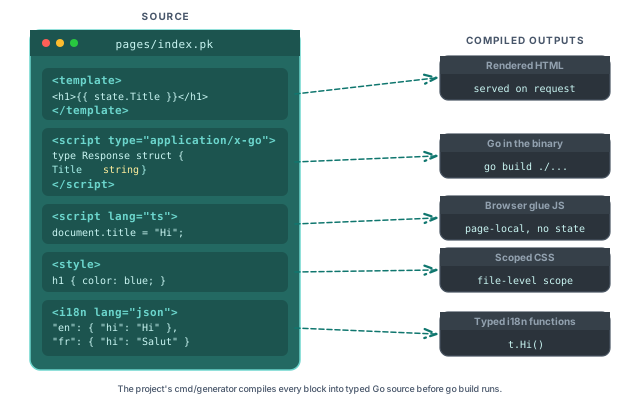
File structure
A PK file consists of up to five sections, all optional except the template:
<template>: HTML markup with Piko directives (required for the file to render).<script type="application/x-go">: server-side Go code.<script lang="ts">: frontend TypeScript or JavaScript for page-local glue (no reactive state; see about PK files).<style>: component-scoped CSS.<i18n lang="json">: translations, keyed by locale.
Minimal example:
<template>
  <h1>{{ state.Title }}</h1>
</template>

<script type="application/x-go">
package main

import "piko.sh/piko"

type Response struct {
    Title string
}

func Render(r *piko.RequestData, props piko.NoProps) (Response, piko.Metadata, error) {
    return Response{Title: "Hello"}, piko.Metadata{}, nil
}
</script>

<style>
h1 { color: blue; }
</style>

<i18n lang="json">
{
  "en": { "greeting": "Hello" },
  "fr": { "greeting": "Bonjour" }
}
</i18n>
The sections can appear in any order. You can have multiple <style> blocks and multiple <i18n> blocks per file.
Template section
The <template> section contains your HTML markup with Piko directives and interpolation.
Interpolation
Double curly braces interpolate values from the state object, which holds the data returned from Render.
<h1>{{ state.Title }}</h1>
<p>{{ state.Description }}</p>
<span>Count: {{ state.Count }}</span>
For all available directives (p-if, p-for, p-on, p-class, etc.), see directives.
Script section
The <script type="application/x-go"> section contains the page's Go server logic. The parser also accepts type="application/go", lang="go", and lang="golang" as equivalent. internal/sfcparser/dto.go defines the MIME types (MimeGo, MimeGoShort).
Package declaration
The package name is either main or matches the component's directory name.
<script type="application/x-go">
package main
// or
package card
</script>
Response struct
A struct named Response declares the shape of data the template receives via state.
type Response struct {
    Title    string
    Posts    []Post
    UserID   int
    IsAdmin  bool
}
Components that return no data declare piko.NoResponse as the response type.
func Render(r *piko.RequestData, props piko.NoProps) (piko.NoResponse, piko.Metadata, error) {
    return piko.NoResponse{}, piko.Metadata{}, nil
}
Render function
Render is the entry point. It receives request data and props and returns the response value, metadata, and an optional error.
func Render(r *piko.RequestData, props piko.NoProps) (Response, piko.Metadata, error) {
    posts, err := domain.GetRecentPosts(10)
    if err != nil {
        return Response{}, piko.Metadata{}, err
    }

    return Response{
        Title: "Blog",
        Posts: posts,
    }, piko.Metadata{
        Title:       "My Blog",
        Description: "Latest blog posts",
    }, nil
}
RequestData methods
*piko.RequestData exposes the following accessors.
Request metadata:
| Method | Description |
|---|---|
Context() | Returns the request context |
Method() | HTTP method (GET, POST, etc.) |
Host() | Request host |
URL() | Parsed request URL (defensive copy) |
ClientIP() | Real client IP resolved by the trusted proxy chain |
RequestID() | Unique request identifier from the RealIP middleware |
Auth() | Authentication context, or nil if unauthenticated |
CSPTokenAttr() | Per-request CSP nonce attribute for inline scripts and styles |
Path, query, and form parameters:
| Method | Description |
|---|---|
PathParam(key) | URL path parameter value |
QueryParam(key) | First query parameter value |
QueryParamValues(key) | All query parameter values |
FormValue(key) | First form field value |
FormValues(key) | All form field values |
PathParams() | defensive copy of all path parameters |
QueryParams() | defensive copy of all query parameters |
FormData() | defensive copy of all form data |
RangePathParams(cb) | Iterates path parameters, callback returns false to stop |
RangeQueryParams(cb) | Iterates query parameters, callback returns false to stop |
RangeFormData(cb) | Iterates form fields, callback returns false to stop |
Cookies:
| Method | Description |
|---|---|
Cookie(name) | Returns the named cookie or http.ErrNoCookie |
Cookies() | defensive copy of all request cookies |
SetCookie(cookie) | Adds a cookie to the HTTP response |
Locale and collections:
| Method | Description |
|---|---|
Locale() | Current request locale |
DefaultLocale() | Fallback locale |
CollectionData() | Pre-fetched collection data for p-collection pages |
WithCollectionData(data) | Returns a copy with the collection data set |
WithDefaultLocale(locale) | Returns a copy with the default locale set |
Internationalisation:
| Method | Description |
|---|---|
T(key, fallback...) | Global translation lookup |
LT(key, fallback...) | Local (component-scoped) translation lookup |
LF(value) | Returns a FormatBuilder for locale-aware formatting |
For all metadata fields (SEO, Open Graph, redirects, status codes), see metadata.
Optional functions
The generator recognises three optional top-level functions by exact name: Middlewares, CachePolicy, and SupportedLocales. A function with a different name compiles, and the generator ignores it.
func Middlewares() []string {
    return []string{"auth", "csrf"}
}

func CachePolicy() piko.CachePolicy {
    return piko.CachePolicy{
        Enabled:       true,
        MaxAgeSeconds: 60,
    }
}

func SupportedLocales() []string {
    return []string{"en", "fr", "de"}
}
For props (struct tags, validation, defaults, coercion, query binding), see the passing props to partials how-to.
Style section
The <style> section contains the component's CSS.
<style>
h1 {
    color: var(--g-colour-primary);
    font-size: 2rem;
}

.card {
    background: white;
    border-radius: 0.5rem;
    padding: 1rem;
}
</style>
A file may contain multiple <style> blocks. The compiler concatenates them.
<style>
div { border: 1px solid black; }
</style>
<style>
div { background: white; }
</style>
The scoped attribute scopes styles to the component instance.
<style scoped>
h1 { color: navy; }
</style>
For the <i18n> block and translation functions (T(), LT()), see i18n.
For importing and using partials (import paths, is attribute), see how to layout partials.
Client-side scripts
Additional <script> blocks declare client-side JavaScript.
<script type="application/javascript">
const app = {
    init() {
        console.log('App initialised');
    }
};
</script>

<script type="module">
import { utils } from './utils.js';
export function setup() {
    utils.configure();
}
</script>
Runtime roots in scope
A <script lang="ts"> block in a PK file has three runtime roots available without import:
| Root | Source | Purpose |
|---|---|---|
pk | per-page context, injected by the compiler | refs (pk.refs, pk.createRefs) and lifecycle hooks (pk.onConnected, pk.onDisconnected, pk.onBeforeRender, pk.onAfterRender, pk.onUpdated, pk.onCleanup) |
piko | global ambient namespace | runtime helpers: piko.bus, piko.partial, piko.partials, piko.nav, piko.form, piko.ui, piko.event, piko.actions, piko.helpers, piko.assets, piko.loader, piko.modal, piko.network, piko.sse, piko.timing, piko.util, piko.trace, piko.autoRefreshObserver, piko.context, piko.hooks, piko.analytics |
action | generated actions.gen.ts | typed server actions, called as action.<package>.<Name>(input).call() |
refs is not exposed on the global piko namespace. Use pk.refs (the per-page context) or pk.createRefs(scope) to populate or read element references.
See also
- Directives - every directive available in a PK template.
- How to layout partials - build reusable partials.