Your first page
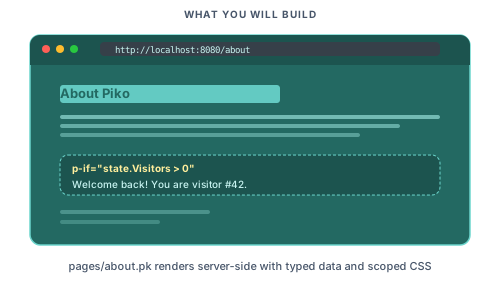
In this tutorial we build an "About" page that pulls data from a Go struct and styles itself with scoped CSS. The page swaps content on a boolean and slots into a shared layout partial.
Prerequisites
Make sure you have:
- Read Concepts for the Piko vocabulary
- Installed the Piko CLI and scaffolded a project (see Install and run)
- Started the dev server with
airorgo run ./cmd/main/main.go dev
Step 1: Create your first page
Create pages/about.pk with the following content:
<template>
  <div class="about-page">
    <h1>About Us</h1>
    <p>Welcome to our website!</p>
  </div>
</template>

<script type="application/x-go">
package main

import "piko.sh/piko"

func Render(r *piko.RequestData, props piko.NoProps) (piko.NoResponse, piko.Metadata, error) {
    return piko.NoResponse{}, piko.Metadata{
        Title: "About Us | MyApp",
    }, nil
}
</script>
Visit http://localhost:8080/about. The heading and welcome text appear. The dev server reloads on save.
For the file format and the Render signature see pk-file format reference.
Step 2: Add dynamic data
Define a Response struct so the template can read fields from it. Update the <script> section:
<script type="application/x-go">
package main

import "piko.sh/piko"

type Response struct {
    CompanyName string
    Founded     int
    TeamSize    int
    Mission     string
}

func Render(r *piko.RequestData, props piko.NoProps) (Response, piko.Metadata, error) {
    return Response{
        CompanyName: "Acme Corporation",
        Founded:     2020,
        TeamSize:    12,
        Mission:     "Welcome to our company",
    }, piko.Metadata{
        Title: "About Acme | MyApp",
    }, nil
}
</script>
Update the <template> to use this data:
<template>
  <div class="about-page">
    <h1>About {{ state.CompanyName }}</h1>
    <p>{{ state.Mission }}</p>

    <div class="stats">
      <div class="stat">
        <strong>Founded: </strong>{{ state.Founded }}
      </div>
      <div class="stat">
        <strong>Team size: </strong>{{ state.TeamSize }} people
      </div>
    </div>
  </div>
</template>
Reload /about. The page renders the company name, mission, founding year, and team size. For the full {{ ... }} expression grammar see template syntax reference.
Step 3: Add scoped styles
Add a <style> section to style your page:
<style>
.about-page {
    max-width: 800px;
    margin: 0 auto;
    padding: 2rem;
    font-family: system-ui, -apple-system, sans-serif;
    h1 {
        color: #6F47EB;
        font-size: 2.5rem;
        margin-bottom: 1rem;
    }
    p {
        font-size: 1.125rem;
        line-height: 1.7;
        color: #374151;
        margin-bottom: 2rem;
    }
    .stats {
        display: flex;
        gap: 2rem;
        margin-top: 2rem;
        .stat {
            background: #f3f4f6;
            padding: 1.5rem;
            border-radius: 0.5rem;
            flex: 1;
            text-align: center;
            strong {
                display: block;
                color: #6b7280;
                font-size: 0.875rem;
                text-transform: uppercase;
                letter-spacing: 0.05em;
                margin-bottom: 0.5rem;
            }
            span {
                display: block;
                color: #1f2937;
                font-size: 1.5rem;
                font-weight: 600;
            }
        }
    }
}
</style>
Reload /about. The heading turns purple and the stat blocks gain padding and rounded corners. Piko scopes styles to this page automatically. For the full scoping model see how to scope and bridge component CSS.
Step 4: Add conditional rendering
Add an IsHiring field and a banner that shows only when it is true. Update your Response:
type Response struct {
    CompanyName string
    Founded     int
    TeamSize    int
    Mission     string
    IsHiring    bool
}

func Render(r *piko.RequestData, props piko.NoProps) (Response, piko.Metadata, error) {
    return Response{
        CompanyName: "Acme Corporation",
        Founded:     2020,
        TeamSize:    12,
        Mission:     "Welcome to our company",
        IsHiring:    true,
    }, piko.Metadata{
        Title: "About Acme | MyApp",
    }, nil
}
Update the template:
<template>
  <div class="about-page">
    <h1>About {{ state.CompanyName }}</h1>
    <p>{{ state.Mission }}</p>

    <div p-if="state.IsHiring" class="hiring-banner">
      <strong>We're hiring!</strong>
      <p>Join our growing team of {{ state.TeamSize }} talented people.</p>
      <piko:a href="/careers" class="button">View Open Positions</piko:a>
    </div>
    <div p-else class="not-hiring">
      <p>We're not currently hiring, but check back soon!</p>
    </div>

    <div class="stats">
      <div class="stat">
        <strong>Founded</strong>
        <span>{{ state.Founded }}</span>
      </div>
      <div class="stat">
        <strong>Team Size</strong>
        <span>{{ state.TeamSize }} people</span>
      </div>
    </div>
  </div>
</template>
Add styles for the banner:
.hiring-banner {
    background: linear-gradient(135deg, #6F47EB 0%, #8B5CF6 100%);
    color: white;
    padding: 1.5rem;
    border-radius: 0.5rem;
    margin-bottom: 2rem;
    text-align: center;
    strong {
        display: block;
        font-size: 1.25rem;
        margin-bottom: 0.5rem;
    }
    p {
        color: rgba(255, 255, 255, 0.9);
        margin-bottom: 1rem;
    }
    .button {
        display: inline-block;
        background: white;
        color: #6F47EB;
        padding: 0.75rem 1.5rem;
        border-radius: 0.375rem;
        text-decoration: none;
        font-weight: 600;
        transition: transform 0.2s;
        &:hover {
            transform: translateY(-2px);
        }
    }
}
.not-hiring {
    background: #f3f4f6;
    padding: 1.5rem;
    border-radius: 0.5rem;
    margin-bottom: 2rem;
    text-align: center;
}
Change IsHiring: true to false and reload. The hiring banner disappears and the "not hiring" block takes its place.
For p-if, p-else, and the <piko:a> meta-element see directives reference.
Step 5: Render a list
Add a Leaders slice and loop over it. Update your Response:
type TeamMember struct {
    Name string
    Role string
}

type Response struct {
    CompanyName string
    Founded     int
    TeamSize    int
    Mission     string
    IsHiring    bool
    Leaders     []TeamMember
}

func Render(r *piko.RequestData, props piko.NoProps) (Response, piko.Metadata, error) {
    return Response{
        CompanyName: "Acme Corporation",
        Founded:     2020,
        TeamSize:    12,
        Mission:     "Welcome to our company",
        IsHiring:    true,
        Leaders: []TeamMember{
            {Name: "Alice Williams", Role: "CEO"},
            {Name: "Bob Smith", Role: "CTO"},
            {Name: "Carol Davis", Role: "Head of Design"},
        },
    }, piko.Metadata{
        Title: "About Acme | MyApp",
    }, nil
}
Add this section below the .stats block in your template:
<div class="team-section">
  <h2>Leadership Team</h2>
  <div class="team-grid">
    <div p-for="member in state.Leaders" class="team-member">
      <h3>{{ member.Name }}</h3>
      <p>{{ member.Role }}</p>
    </div>
  </div>
</div>
Add styles:
.team-section {
    margin-top: 3rem;
    h2 {
        font-size: 1.75rem;
        color: #1f2937;
        margin-bottom: 1.5rem;
    }
    .team-grid {
        display: grid;
        grid-template-columns: repeat(auto-fit, minmax(200px, 1fr));
        gap: 1.5rem;
        .team-member {
            background: white;
            border: 1px solid #e5e7eb;
            padding: 1.5rem;
            border-radius: 0.5rem;
            text-align: center;
            h3 {
                font-size: 1.125rem;
                color: #1f2937;
                margin: 0 0 0.5rem 0;
            }
            p {
                color: #6b7280;
                font-size: 0.875rem;
                margin: 0;
            }
        }
    }
}
Reload /about. Three leadership cards appear. For the (index, item) in collection form see directives reference.
Step 6: Use a layout partial
Most pages share a header and footer. Create partials/layout.pk:
<template>
<div class="app-layout">
<header class="header">
<nav>
<piko:a href="/">Home</piko:a>
<piko:a href="/about">About</piko:a>
<piko:a href="/contact">Contact</piko:a>
</nav>
</header>
<main class="content">
<!-- This is where the page content goes -->
<piko:slot />
</main>
<footer class="footer">
<p>© 2025 {{ props.CompanyName }}. All rights reserved.</p>
<!-- A named slot lets pages inject extra footer content. -->
<piko:slot name="footer" />
</footer>
</div>
</template>
<script type="application/x-go">
package main
import "piko.sh/piko"
type Props struct {
CompanyName string `prop:"company_name"`
PageTitle string `prop:"page_title"`
PageDescription string `prop:"page_description"`
}
func Render(r *piko.RequestData, props Props) (piko.NoResponse, piko.Metadata, error) {
return piko.NoResponse{}, piko.Metadata{}, nil
}
</script>
<style>
.app-layout {
min-height: 100vh;
display: flex;
flex-direction: column;
font-family: system-ui, -apple-system, sans-serif;
.header {
background: #1f2937;
padding: 1rem 2rem;
nav {
display: flex;
gap: 1.5rem;
max-width: 1200px;
margin: 0 auto;
a {
color: white;
text-decoration: none;
font-weight: 500;
transition: color .2s;
&:hover {
color: #A194CC;
}
}
}
}
.content {
flex: 1;
}
.footer {
background: #f3f4f6;
padding: 2rem;
text-align: center;
color: #6b7280;
}
}
</style>
Wrap your about page with the layout:
<template>
  <piko:partial
      is="layout"
      :server.company_name="state.CompanyName"
      :server.page_title="'About ' + state.CompanyName"
      :server.page_description="state.Mission">
    <div class="about-page">
      <h1>About {{ state.CompanyName }}</h1>
      <!-- rest of your content -->
    </div>
  </piko:partial>
</template>

<script type="application/x-go">
package main

import (
    "piko.sh/piko"
    layout "myapp/partials/layout.pk"
)

// Rest of your script...
</script>
Replace myapp with your module name from go.mod. Reload /about. The page now has the dark header and grey footer.
The layout's template reads {{ props.CompanyName }} directly because Render returns piko.NoResponse{} and the partial has nothing of its own to expose. Pages that build a Response keep using state.X for the rendered values.
For partial imports, props, and the server. prefix see how to passing props to partials.
Step 7: Mark the active navigation link
Add a CurrentPage prop so the layout marks the current entry with an active class. Update partials/layout.pk:
<template>
<div class="app-layout">
<header class="header">
<nav>
<piko:a href="/" :class="props.CurrentPage == 'home' ? 'active' : ''">Home</piko:a>
<piko:a href="/about" :class="props.CurrentPage == 'about' ? 'active' : ''">About</piko:a>
<piko:a href="/contact" :class="props.CurrentPage == 'contact' ? 'active' : ''">Contact</piko:a>
</nav>
</header>
<main class="content">
<piko:slot />
</main>
<footer class="footer">
<p>© 2025 {{ props.CompanyName }}. All rights reserved.</p>
<piko:slot name="footer" />
</footer>
</div>
</template>
<script type="application/x-go">
package main
import "piko.sh/piko"
type Props struct {
CompanyName string `prop:"company_name"`
CurrentPage string `prop:"current_page"`
PageTitle string `prop:"page_title"`
PageDescription string `prop:"page_description"`
}
func Render(r *piko.RequestData, props Props) (piko.NoResponse, piko.Metadata, error) {
return piko.NoResponse{}, piko.Metadata{}, nil
}
</script>
<style>
/* ... previous styles ... */
.header a.active {
color: #A194CC;
border-bottom: 2px solid #6F47EB;
}
</style>
Pass current_page from the about page:
<piko:partial
    is="layout"
    :server.company_name="state.CompanyName"
    :server.current_page="'about'"
    :server.page_title="'About ' + state.CompanyName"
    :server.page_description="state.Mission">
  <!-- content -->
</piko:partial>
Reload /about. The "About" link in the nav has a purple underline.
Complete example
Here is the full pages/about.pk:
<template>
  <piko:partial
      is="layout"
      :server.company_name="state.CompanyName"
      :server.current_page="'about'"
      :server.page_title="'About ' + state.CompanyName"
      :server.page_description="state.Mission">
    <div class="about-page">
      <h1>About {{ state.CompanyName }}</h1>
      <p>{{ state.Mission }}</p>

      <!-- Conditional rendering with p-if -->
      <div p-if="state.IsHiring" class="hiring-banner">
        <strong>We're hiring!</strong>
        <p>Join our growing team of {{ state.TeamSize }} talented people.</p>
        <piko:a href="/careers" class="button">View Open Positions</piko:a>
      </div>
      <div p-else class="not-hiring">
        <p>We're not currently hiring, but check back soon!</p>
      </div>

      <div class="stats">
        <div class="stat">
          <strong>Founded</strong>
          <span>{{ state.Founded }}</span>
        </div>
        <div class="stat">
          <strong>Team Size</strong>
          <span>{{ state.TeamSize }} people</span>
        </div>
      </div>

      <div class="team-section">
        <h2>Leadership Team</h2>
        <div class="team-grid">
          <div p-for="member in state.Leaders" class="team-member">
            <h3>{{ member.Name }}</h3>
            <p>{{ member.Role }}</p>
          </div>
        </div>
      </div>
    </div>
  </piko:partial>
</template>

<script type="application/x-go">
package main

import (
	"piko.sh/piko"
	layout "myapp/partials/layout.pk"
)

type TeamMember struct {
    Name string
    Role string
}

type Response struct {
    CompanyName string
    Founded     int
    TeamSize    int
    Mission     string
    IsHiring    bool
    Leaders     []TeamMember
}

func Render(r *piko.RequestData, props piko.NoProps) (Response, piko.Metadata, error) {
    return Response{
        CompanyName: "Acme Corporation",
        Founded:     2020,
        TeamSize:    12,
        Mission:     "Welcome to our company",
        IsHiring:    true,
        Leaders: []TeamMember{
            {Name: "Alice Williams", Role: "CEO"},
            {Name: "Bob Smith", Role: "CTO"},
            {Name: "Carol Davis", Role: "Head of Design"},
        },
    }, piko.Metadata{
        Title: "About Acme | MyApp",
    }, nil
}
</script>

<style>
body {
    margin: 0;
}
.about-page {
    max-width: 800px;
    margin: 0 auto;
    padding: 2rem;
    font-family: system-ui, -apple-system, sans-serif;
    h1 {
        color: #6F47EB;
        font-size: 2.5rem;
        margin-bottom: 1rem;
    }
    p {
        font-size: 1.125rem;
        line-height: 1.7;
        color: #374151;
        margin-bottom: 2rem;
    }
    .stats {
        display: flex;
        gap: 2rem;
        margin-top: 2rem;
        .stat {
            background: #f3f4f6;
            padding: 1.5rem;
            border-radius: 0.5rem;
            flex: 1;
            text-align: center;
            strong {
                display: block;
                color: #6b7280;
                font-size: 0.875rem;
                text-transform: uppercase;
                letter-spacing: 0.05em;
                margin-bottom: 0.5rem;
            }
            span {
                display: block;
                color: #1f2937;
                font-size: 1.5rem;
                font-weight: 600;
            }
        }
    }
}

.hiring-banner {
    background: linear-gradient(135deg, #6F47EB 0%, #8B5CF6 100%);
    color: white;
    padding: 1.5rem;
    border-radius: 0.5rem;
    margin-bottom: 2rem;
    text-align: center;
    strong {
        display: block;
        font-size: 1.25rem;
        margin-bottom: 0.5rem;
    }
    p {
        color: rgba(255, 255, 255, 0.9);
        margin-bottom: 1rem;
    }
    .button {
        display: inline-block;
        background: white;
        color: #6F47EB;
        padding: 0.75rem 1.5rem;
        border-radius: 0.375rem;
        text-decoration: none;
        font-weight: 600;
        transition: transform 0.2s;
        &:hover {
             transform: translateY(-2px);
         }
    }
}
.not-hiring {
    background: #f3f4f6;
    padding: 1.5rem;
    border-radius: 0.5rem;
    margin-bottom: 2rem;
    text-align: center;
}

.team-section {
    margin-top: 3rem;
    h2 {
        font-size: 1.75rem;
        color: #1f2937;
        margin-bottom: 1.5rem;
    }
    .team-grid {
        display: grid;
        grid-template-columns: repeat(auto-fit, minmax(200px, 1fr));
        gap: 1.5rem;
        .team-member {
            background: white;
            border: 1px solid #e5e7eb;
            padding: 1.5rem;
            border-radius: 0.5rem;
            text-align: center;
            h3 {
                font-size: 1.125rem;
                color: #1f2937;
                margin: 0 0 0.5rem 0;
            }
            p {
                color: #6b7280;
                font-size: 0.875rem;
                margin: 0;
            }
        }
    }
}
</style>
Where to next
- Next tutorial: Adding interactivity adds a client-side counter and a todo list.
- Reference: PK file format reference for every field on
RequestDataandMetadata, directives reference forp-if,p-else,p-for, and template syntax reference for{{ ... }}expressions. - Explanation: About PK files and About SSR cover the rendering model.
- How-to: Pass props to partials to reuse the layout across other pages, scoped CSS, and conditional rendering.
- Runnable source:
examples/scenarios/001_hello_world/andexamples/scenarios/005_blog_with_layout/.