Piko documentation
Piko is a website development kit for building server-side-rendered web applications with interactive client-side components (about SSR, about reactivity). It combines Go's performance and type safety with a Vue-inspired templating syntax (about Piko, Vue, and Nuxt). The hexagonal architecture lets a project swap storage, caching, email, or AI backends without touching application code (about the hexagonal architecture).
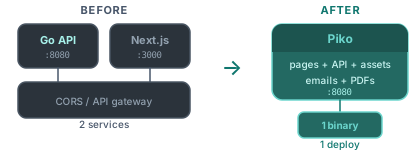
A Piko project ships as one Go binary. The HTTP server, compiled templates, actions, and assets all live inside that single file, which go build produces.
A quick look
A single PK file contains template, Go, and CSS. Piko compiles the template against the Go types declared in the file and serves the rendered HTML.
<template>
  <div class="container">
    <h1>HTTP Headers</h1>
    <ul>
      <li p-for="(key, value) in state.Headers" p-key="key">
        {{ key }}: {{ value }}
      </li>
    </ul>
  </div>
</template>

<script type="application/x-go">
  package main

  import "piko.sh/piko"

  type Response struct {
      Headers map[string]string
  }

  func Render(r *piko.RequestData, props piko.NoProps) (Response, piko.Metadata, error) {
      return Response{
          Headers: map[string]string{
              "Content-Type": "text/html",
              "X-Request-ID": "abc-123",
          },
      }, piko.Metadata{}, nil
  }
</script>

<style>
.container {
    font-family: monospace;
    ul {
        list-style: circle;
    }
}
</style>
A PK file looks similar to a Vue.js single-file component, with a template block and a script block. The script is Go (not JavaScript), and the expression language inside {{ }} compiles to pure Go, so no code runs on the client. The PK file format reference documents every section. Concepts walks through every other named piece (PKC components, actions, partials, collections, the querier, services, i18n). Install and run gets a server running in under five minutes.
Where to read next
This folder holds four onboarding pages. Introduction, install, concepts, and project structure. After reading them, the rest of the documentation splits into four areas:
- Tutorials teach Piko step by step. Start with Your first page after the dev server is running.
- How-to guides answer "how do I?" for specific tasks: routing, forms, collections, i18n, testing, deployment.
- Reference documents every public API, directive, file format, and configuration option.
- Explanation answers "why": the rendering model, the action protocol, the hexagonal architecture.
Requirements
Piko targets Go 1.27 or later. See Install and run for the full setup steps.