Concepts
Before diving fully into what Piko is and how it works, it is beneficial to get used to the essential concepts, so that diving deeper feels more natural.
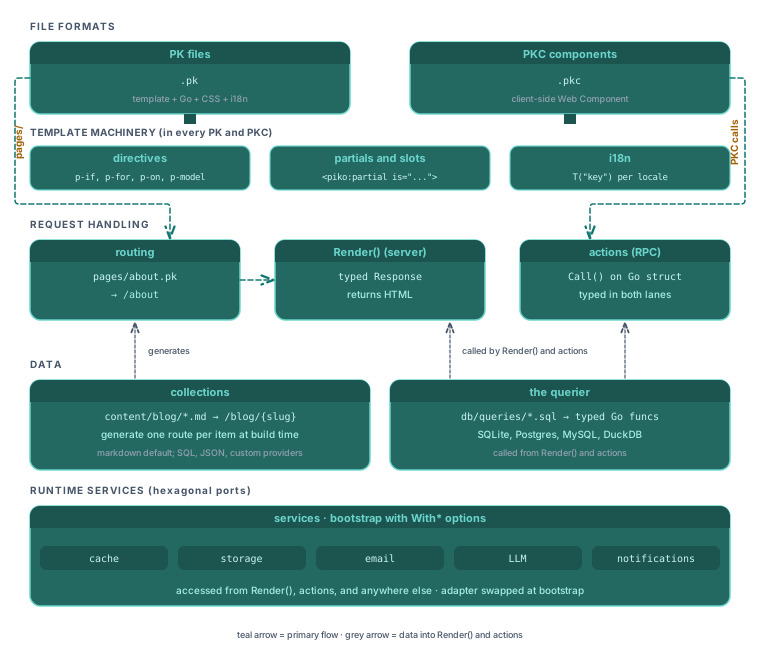
File formats
PK files
A PK file (.pk extension) is the single-file component format for server-rendered pages. Up to six sections live in one file. An HTML <template>, a Go <script type="application/x-go">, an optional client-side <script lang="ts">, a <style> block, an <i18n lang="json"> block, and a <piko:timeline> block for dev-mode component previews. The Go script declares types, the template binds to those types, and the whole thing compiles to a Go BuildAST function that returns a runtime template tree. The framework renders that tree to HTML at request time. See pk-file format reference for the full grammar and about PK files for why Piko chose the single-file shape.
PKC components
A PKC file (.pkc extension) is the client-side counterpart to a PK file. It compiles to a Web Component with reactive state, shadow DOM, and lifecycle hooks. Mount one inside a PK template by writing a custom-element tag (<pp-counter />) and the browser upgrades it on load. PKC handles client-side interactivity that the server cannot retain across requests (local state, click handlers, two-way input binding). Heavy computation and authoritative data still live server-side. See client components reference for the file format and about reactivity for the PK/PKC split.
Template machinery
Directives
Directives are the attributes that control rendering inside templates. p-if, p-else, p-for, p-key, p-on:click, p-model, p-class, p-bind, p-html, and more. The same directive set works in both PK and PKC templates. The expression language inside directive values is a small Go-like DSL. See directives reference and template syntax reference.
Partials and slots
A partial is a reusable PK fragment. Use <piko:partial is="layout"> to pull one into a page, and <piko:slot /> inside the partial to mark where the caller's content goes. Named slots (<piko:slot name="footer" />) let a single partial accept content in more than one region. Partials are the mechanism for layouts, cards, navigation bars, and any other repeated structure. See how to layout partials for the task recipe.
i18n
Translation files live as JSON under locales/ (configurable, with locales/ as the Piko default) and inside per-page <i18n> blocks. A template or Render calls r.T("key") for a global lookup or r.LT("key") for a page-scoped one. Both return a *Translation builder. Chain typed setters (StringVar, IntVar, MoneyVar, Count, TimeVar) and the value renders to a string in the active locale. URL strategies are query-only (default), prefix, prefix_except_default, and disabled. See i18n API reference, about i18n, and tutorial 07: going multilingual for a guided build.
Request handling
Server rendering
Piko renders HTML on the server. A request hits the router, the matching page's Render function runs, and the server writes HTML to the response. JavaScript does not compose the page. Only PKC islands embedded in the HTML ship JavaScript, and each island runs on its own. See about SSR for why Piko rejects hydration and what the trade-offs are.
Routing
Routes come from the filesystem. A file at pages/about.pk serves /about. A file at pages/blog/{slug}.pk serves /blog/{slug}. A file at pages/admin/!404.pk serves the 404 page for the /admin subtree. Piko derives the whole URL map from ls pages/, so there is no route-registration table to maintain. See routing rules reference for the filename-to-URL grammar and about routing for the design trade-offs.
Note: Three filename conventions drive routing:
{slug}.pkcaptures one URL segment,{...slug}.pkcaptures the trailing path, and a leading!flags an error page. Error pages accept a single status (!404.pk,!500.pk), a status range (!400-499.pk), or the!error.pkcatch-all. Any other!-prefixed.pkis a build error. See routing rules reference.
Actions
An action is a typed RPC between a PKC component and the server. A Go struct under actions/ embeds piko.ActionMetadata and implements a Call method. The generator emits a TypeScript call shape so action.contact.Submit(form).call() on the client invokes the Go function on the server with CSRF, rate limiting, and validation already handled. For long-running responses, actions implement StreamProgress to emit Server-Sent Events. See server actions reference and about the action protocol.
Data
Collections
A collection turns content files into routes. A page template that declares p-collection="blog" generates one route per item in the blog collection, and each item's frontmatter shows up as typed data in Render. Markdown is the default source (driver_markdown). A mock CMS driver also ships. Custom providers fit the same interface, so you can add SQL tables, JSON APIs, and other sources by implementing the driver port. See collections API reference and about collections.
The querier
When a project needs a real database (SQLite, PostgreSQL, MySQL, DuckDB), the project's scaffolded generator (cmd/generator/main.go, run with piko generate or go run ./cmd/generator/main.go all directly) reads .sql files with annotations and emits type-safe Go functions. A query annotated -- piko.query(name: ListRows, command: many) becomes a function returning []Row. Actions and render functions call the generated querier instead of writing raw SQL strings. See tutorial 05: data-backed pages for a guided build and querier reference for the annotation grammar.
Runtime services
Services and bootstrap
Services (storage, cache, email, LLM, notifications, crypto, analytics, and more) plug into Piko through interfaces. The application wires concrete implementations in main.go via With* options: WithDatabase, WithCacheProvider, WithBackendAnalytics, WithEmailProvider. A test swaps the implementation. A production deploy swaps to S3, Redis, SES, or whatever fits. See bootstrap options reference for every With* and about the hexagonal architecture for the pattern.
Ready to build something
Start with Your first page. The tutorial walks through creating a page, binding data, adding styles, and conditional rendering. After that, the sequence continues through interactivity, server actions, composition, data-backed pages, testing, and i18n.
The rest of the documentation splits by reader need. How-to guides answer task questions. The reference documents every API surface. Explanation pages answer design questions. Start with Your first page and follow the inline links from there.