Project structure
This page is a map. When piko new finishes, the project directory looks like the tree below. Each folder has a role and a canonical place in the docs where it gets discussed in depth. Use the table that follows the tree to jump to whatever you are looking at right now.
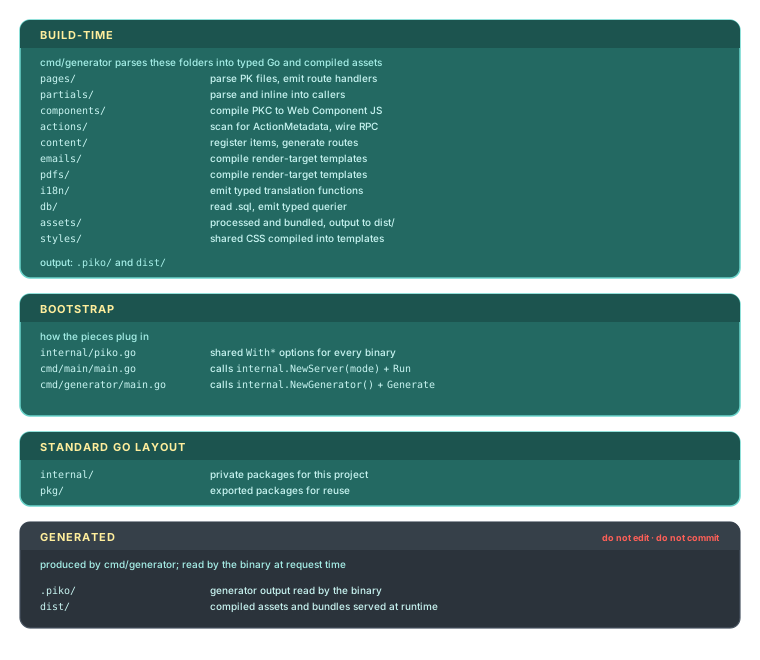
For the "why this shape" (the reasoning behind the folder conventions and the generator pipeline that relies on them), see about project structure.
The scaffolded tree
my-app/
├── dist/                 # Generated Go (action registry, page handlers) plus compiled assets. Committed; the binary blank-imports it.
├── actions/              # Server actions (Go), with one subdirectory per package (e.g. actions/greeting)
├── components/           # Client components (.pkc)
├── pages/                # Page routes (.pk)
├── partials/             # Reusable template fragments (.pk)
├── pkg/                  # Public Go packages (optional)
├── lib/icons/            # SVG icons used by the scaffolded layout
├── e2e/                  # End-to-end tests
├── internal/
│   └── piko.go           # Shared piko configuration: NewServer(mode) for runtime, NewGenerator() for build-time. Both binaries call it.
├── cmd/
│   ├── generator/main.go # Build-time generator. Calls internal.NewGenerator() and ssr.Generate(...).
│   └── main/main.go      # Runtime server. Calls internal.NewServer(command) and ssr.Run(command).
├── .air.toml             # Air live-reload configuration
├── .dockerignore
├── .gitignore
├── Dockerfile
├── go.mod
└── go.work
The wizard creates only the folders shown above (it does scaffold internal/piko.go inside internal/). Other directories appear as a project grows. Add emails/ for mail templates, pdfs/ for PDF templates, content/ for markdown collections, locales/ for translation files, assets/ for static files, styles/ for shared CSS, and db/ for SQL queries and migrations as needed. The generator writes runtime artefacts under .piko/ (gitignored) and writes generated Go and compiled assets into dist/. The wizard scaffolds dist/generated.go so a fresh checkout builds without first running the generator. The cmd/main binary blank-imports dist/ to register actions, so commit dist/.
Folder-by-folder
| Folder | Contains | Where to read next |
|---|---|---|
pages/ | .pk files. One file per route. The filename (pages/about.pk) maps to the URL (/about). | routing rules reference, tutorial 01: your first page |
partials/ | Reusable PK fragments composed into pages with <piko:partial is="layout">. Not routable. | how to layout partials |
components/ | PKC files. Each becomes a Web Component on the client. Convention: prefix project components with pp-. | client components reference, tutorial 02: adding interactivity |
actions/ | Go structs embedding piko.ActionMetadata. Each becomes a typed RPC endpoint. One subdirectory per package. | server actions reference, tutorial 03: server actions and forms |
emails/ | PK templates rendered to PML for email delivery. Create when needed. | how to email templates, about email rendering |
pdfs/ | PK templates rendered to PDF. Create when needed. | how to PDF generation |
content/ | Markdown files (or other collection sources). Create when a page declares p-collection. | collections API reference, tutorial 04: shipping a real site |
locales/ | One JSON file per locale. Global translations accessed through r.T("key"). Create when adding i18n. | i18n API reference, tutorial 07: going multilingual |
assets/ | Static files (images, fonts, icons). Create when needed. | how to assets |
styles/ | Shared CSS imported by pages and partials. Create when needed. | how to scope and bridge component CSS |
db/ | SQL query files (db/queries/*.sql) and migrations (db/migrations/*.sql). Create when adding a database. | tutorial 05: data-backed pages, querier reference |
pkg/ | Public Go packages exported for reuse. | (standard Go layout) |
lib/icons/ | SVG icons referenced by the scaffolded layout. | (project-local) |
e2e/ | End-to-end tests for the scaffolded site. | (project-local) |
internal/piko.go | Shared With* option set used by every binary. Exposes NewServer(mode, extras...) for the runtime server and NewGenerator(extras...) for build-time tools. | bootstrap options reference |
cmd/generator/ | Build-time generator. Calls internal.NewGenerator(...) and ssr.Generate(ctx, mode). Invoke with piko generate, or go run ./cmd/generator/main.go all directly. | CLI reference |
cmd/main/ | Runtime server. Calls internal.NewServer(command, ...) and ssr.Run(command). The mode comes from os.Args[1] (dev, dev-i, or prod). | bootstrap options reference, about the hexagonal architecture |
Configuration
You configure Piko entirely through Go code. Most settings live as With* options on piko.New(...). Some settings also expose environment variables via struct tags (for example PIKO_PORT, PIKO_I18N_SOURCE_DIR, PIKO_ACTION_SERVE_PATH, LOG_LEVEL) which act as overrides when set. When WithWebsiteConfig is not supplied the framework also reads a config.json file if present.
The wizard scaffolds a small internal/piko.go package that collects the project's shared option set in one place. That way cmd/main/main.go and cmd/generator/main.go (and any other binary you add) all draw from the same source of truth:
// internal/piko.go (excerpt)
func baseOptions() []Option {
    return []Option{
        piko.WithCSSReset(piko.WithCSSResetComplete()),
        piko.WithAutoMemoryLimit(automemlimit.Provider()),
        piko.WithImageProvider("imaging", imaging.NewProvider(imaging.Config{})),
        piko.WithAutoNextPort(true),
        piko.WithWebsiteConfig(piko.WebsiteConfig{ /* theme, fonts, ... */ }),
        // optional, depending on wizard choices:
        // piko.WithJSONProvider(sonicjson.New()),
        // piko.WithValidator(playground.NewValidator()),
    }
}

func NewServer(mode string, extras ...Option) *Server {
    opts := baseOptions()
    if mode == RunModeDev || mode == RunModeDevInterpreted {
        opts = append(opts, piko.WithDevWidget(), piko.WithDevHotreload())
    }
    return piko.New(append(opts, extras...)...)
}

func NewGenerator(extras ...Option) *Server {
    return piko.New(append(baseOptions(), extras...)...)
}
The exact set in your project depends on the wizard's optional toggles (Sonic JSON, validator, interpreted mode, agents). Add new options to baseOptions(). Pass binary-specific options (databases, providers, custom routes) as extras from each cmd/*/main.go. See configuration philosophy and bootstrap options reference.
The wizard scaffolds these supporting files:
| File | Purpose | Where to read next |
|---|---|---|
.air.toml | Air live-reload configuration. Watches Go files and templates, restarts the server. | Air on GitHub |
Dockerfile | Production container build. Scaffolded with sensible defaults. | how to production build |
.dockerignore, .gitignore | Ignore files for Docker and git. | (standard) |
What stays out of version control
The generator produces output under .piko/ and dist/. Both directories are auto-managed. Do not edit them by hand. The scaffolded .gitignore excludes .piko/ along with tmp/, bin/, .out/, air.log, and the usual IDE and OS files (.idea/, .vscode/, .DS_Store). dist/ is not gitignored. cmd/main/main.go blank-imports it (_ "<module>/dist") so action init() registration runs at startup, and the wizard scaffolds dist/generated.go so a fresh checkout builds without first running the generator. Commit dist/.
What to do next
- Your first page makes the first real edit in
pages/. - Concepts names every piece so the folders and their contents make sense in context.
- About project structure explains why the layout is what it is and how the generator reads it.