Routing rules
Piko routes requests by walking the pages/ directory at build time. This page documents the mapping rules, parameter syntax, precedence, and accessor methods. For task recipes see the how-to guides on basic routes, dynamic routes, and catch-all routes.
File-to-route mapping
Each .pk file in pages/ becomes one route.
| File path | URL |
|---|---|
pages/index.pk | / |
pages/about.pk | /about |
pages/blog/index.pk | /blog |
pages/blog/{slug}.pk | /blog/{slug} |
pages/docs/{slug}*.pk | /docs/{slug}* |
pages/users/{userId}/posts/{postId}.pk | /users/{userId}/posts/{postId} |
The build resolves routing. Changes to pages/ require a rebuild (go run ./cmd/generator/main.go all or piko dev).
Segment syntax
| Syntax | Matches | Example file | Matches URL |
|---|---|---|---|
| Literal | exact segment | pages/about.pk | /about |
{name} | one segment | pages/blog/{slug}.pk | /blog/my-post |
{name}* | one or more segments | pages/docs/{slug}*.pk | /docs/a/b/c |
{name:regex} | one or more segments matching a regex | pages/docs/{path:.+}.pk, pages/docs/{path:[a-zA-Z0-9/_-]+}.pk | /docs/a/b/c |
index.pk | directory base | pages/blog/index.pk | /blog |
The router uses Chi route patterns end-to-end. The filename (minus .pk) becomes the URL pattern verbatim - {name} for a single dynamic segment, {name}* for a catch-all. Logs, the manifest, and the registered Chi routes all use that form. The router rewrites regex catch-alls ({name:regex}) to chi's * capture and aliases them back to the named parameter at request time, so r.PathParam("path") returns the captured remainder.
Dynamic segments capture whatever segment appears in the URL. Catch-all segments capture the remainder of the path including slashes.
Precedence
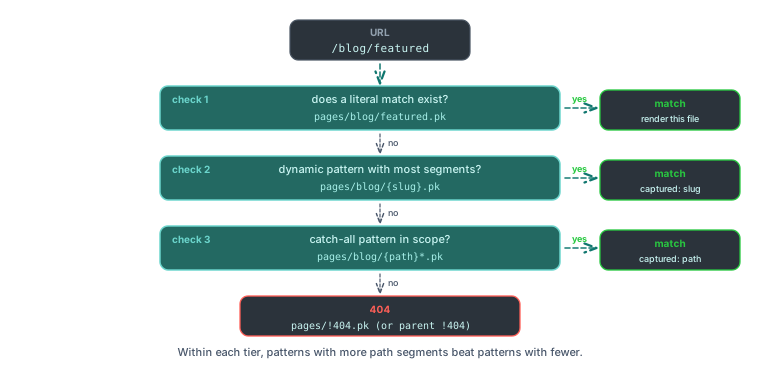
When two or more patterns match the same URL, Piko sorts candidates by:
- Route type: static (no
{) > dynamic (one or more{name}) > catch-all ({name}*or{name:regex}). - Higher total path-segment count first.
- Higher literal-segment count first (segments without
{). - Alphabetical key order as the final tiebreaker.
Example: pages/blog/featured.pk beats pages/blog/{id}.pk on /blog/featured. pages/blog/{id}.pk beats pages/blog/{slug}*.pk on /blog/42. The literal-count step breaks ties between equal-segment dynamic patterns: /blog/featured/{id} (two literals) wins over /blog/{slug}/{id} (one literal).
Route parameter accessors
Routes expose their captured parameters through piko.RequestData:
| Method | Returns | Behaviour |
|---|---|---|
r.PathParam(name) | string | Returns the captured value or an empty string if the name is not in the route. |
r.PathParams() | map[string]string | Returns every captured parameter. |
r.QueryParam(name) | string | First value of the query-string parameter, or empty string. |
r.QueryParamValues(name) | []string | All values for a repeated query-string parameter. |
Catch-all parameters surface the full trailing path as a single string (for example a/b/c from /docs/a/b/c).
Index routes
A file named index.pk handles the base path of its directory:
pages/
  index.pk          # /
  blog/
    index.pk        # /blog
    {id}.pk         # /blog/{id}
HTTP methods
Page routes register both GET and POST so the same handler can serve initial page loads (GET) and action submissions to the same URL (POST). PUT, PATCH, DELETE, and OPTIONS are not registered. Use server actions for general mutations. The POST registration on page routes exists so action calls can land on the same path that rendered the form.
Status codes
Successful page renders write 200 OK. Non-200 status codes come from typed errors returned by Render, not from piko.Metadata.Status (the field is not read by the response writer):
return Response{}, piko.Metadata{}, &piko.NotFoundError{Message: "not found"}
Redirects come from piko.Metadata.ClientRedirect (changes the browser URL) or piko.Metadata.ServerRedirect (internal rewrite, preserves the browser URL). Pair ClientRedirect with RedirectStatus. The validator accepts 301, 302, 303, and 307 and falls back to 302 for any other value. See the errors reference for the full error-type-to-status mapping and the metadata reference for why Metadata.Status is not consulted.
See also
- About routing for why routes derive from filenames.
- How to basic routes.
- How to dynamic routes.
- How to catch-all routes.
- How to apply middleware to a page for authentication and request shaping.
- How to enable i18n routing for a page for locale-prefixed routes.
- How to control route priority for resolving overlap between dynamic routes.
- How to serve from a URL prefix for
BaseServePathconfiguration. - Metadata reference for status codes and redirects.
Used in: Scenario 004: product catalogue, Scenario 005: blog with layout, Scenario 006: data table.