How to stream action responses with SSE
Long-running actions can stream progress to the client via Server-Sent Events (SSE) instead of forcing the browser to wait for one large response. This guide shows how to build a streaming action. See the server-actions reference for the full API and Scenario 010: progress tracker for the runnable example.
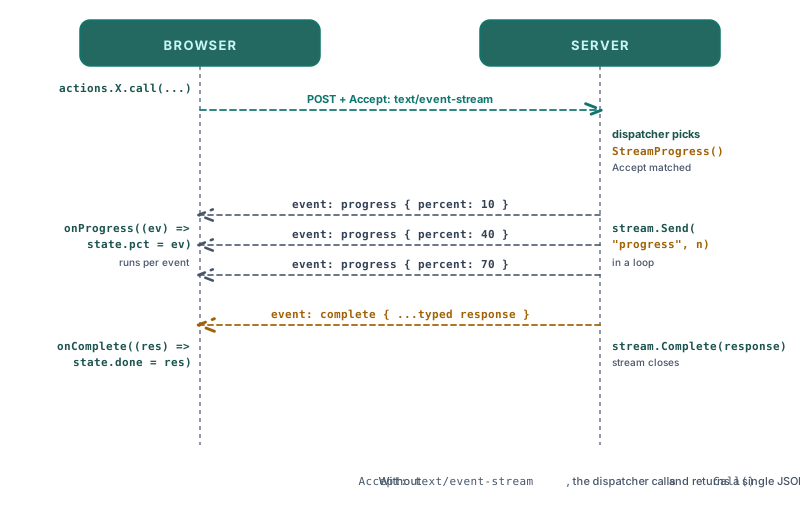
Implement SSECapable
A streaming action implements the piko.SSECapable interface in addition to its normal Call method:
package task

import (
    "fmt"
    "time"

    "piko.sh/piko"
)

type ProcessInput struct {
    JobID string `json:"jobID" validate:"required"`
}

type ProcessResponse struct {
    JobID string `json:"job_id"`
}

type ProcessAction struct {
    piko.ActionMetadata
}

func (a *ProcessAction) Call(input ProcessInput) (ProcessResponse, error) {
    return ProcessResponse{JobID: input.JobID}, nil
}

func (a *ProcessAction) StreamProgress(stream *piko.SSEStream) error {
    for i := 0; i <= 100; i += 10 {
        event := map[string]any{
            "done":  i,
            "total": 100,
            "label": fmt.Sprintf("Processing step %d", i),
        }
        if err := stream.Send("progress", event); err != nil {
            return err
        }
        time.Sleep(500 * time.Millisecond)
    }

    return stream.SendComplete(ProcessResponse{JobID: "done"})
}
The runtime selects StreamProgress when the client requests Accept: text/event-stream. Otherwise Call runs as a normal action.
Consume the stream from the browser
Call the action with .withOnProgress(callback).call(). The callback receives each streamed event:
<template>
  <button p-on:click="handleClick">Start</button>
  <progress :value="state.Progress" max="100"></progress>
</template>

<script lang="ts">
async function handleClick(): Promise<void> {
    const result = await action.task.Process({ jobID: "abc-123" })
        .withOnProgress((data: unknown, eventType: string) => {
            const event = data as { done: number; total: number; label: string };
            state.Progress = (event.done / event.total) * 100;
        })
        .call();

    // `result` is the typed response returned from Call() (or SendComplete in StreamProgress).
    console.log("Finished", result.job_id);
}
</script>
Pick a payload shape and use it on both sides. The example above uses { done, total, label } consistently: the server emits those fields and the client casts to the same type.
The callback receives (data, eventType): data is the payload for a single event, and eventType is the event name passed to stream.Send. The final value from .call() is the typed response the action returned (usually via stream.SendComplete).
Reach a stream with EventSource
.withOnProgress(...).call() sends a POST with Accept: text/event-stream, so it carries the CSRF token pair like any other action call and needs nothing extra.
The browser EventSource API is different: it can only issue GET and can set no headers, so it can never carry that token pair. An action therefore gets a GET route only if it asks for one, by implementing piko.SSEGetAliasable:
func (a *NotifyAction) SSEGetAlias() {}
This also applies to piko.sse.subscribe(), which is built on EventSource. Without the declaration the connection fails.
Resume after a dropped connection
SSE clients can resume from the last received event ID. Send an event ID on each message:
func (a ProcessAction) StreamProgress(stream *piko.SSEStream) error {
    for i, step := range steps {
        event := map[string]any{
            "step": step.Name,
            "done": i + 1,
        }
        if err := stream.SendWithID(fmt.Sprintf("%d", i+1), "progress", event); err != nil {
            return err
        }
    }
    return stream.SendComplete(nil)
}
SendWithID(id, event, data) takes the event ID first, then the event name, then the payload. Inside a stream callback the canonical accessor for the resumed ID is stream.LastEventID(). From outside the stream, the Headers field on RequestMetadata exposes request headers: a.Request().Headers.Get("Last-Event-ID").
Close on client disconnect
a.Ctx().Done() fires when the client closes the stream. Check it between iterations:
for i := 0; i < len(steps); i++ {
    select {
    case <-a.Ctx().Done():
        return a.Ctx().Err()
    default:
    }
    // ... process step i
}
Handling errors mid-stream
The runtime does not auto-emit an event when StreamProgress returns an error. It logs the failure and records it on the trace span, then closes the stream. To surface a typed error to the client, call stream.SendError yourself before returning:
if err := runStep(step); err != nil {
    if sendErr := stream.SendError(err); sendErr != nil {
        return fmt.Errorf("sending error event: %w", sendErr)
    }
    return fmt.Errorf("step %d: %w", i, err)
}
SendError emits an error event whose payload contains the error message. The frontend can attach an addEventListener('error', ...) on the stream wrapper to react to it. Without an explicit SendError, the browser sees EOF.
See also
- Server actions reference for the full API including
SSECapableandSSEStream. - About the action protocol for how the client receives streamed responses.
- How to forms for non-streaming actions.
- Scenario 010: progress tracker for a runnable walkthrough.
- Scenario 008: event-bus chat for a chat-style stream over the event bus.
Integration test: tests/integration/e2e_browser/ exercises SSE actions end-to-end.