How to control component attribute merging
When a parent template invokes a partial, Piko merges the invocation's attributes with the partial's root element using three rules. This guide explains the rules and how to predict the result. For the full template syntax see template syntax reference. For the partial format see pk-file format reference.
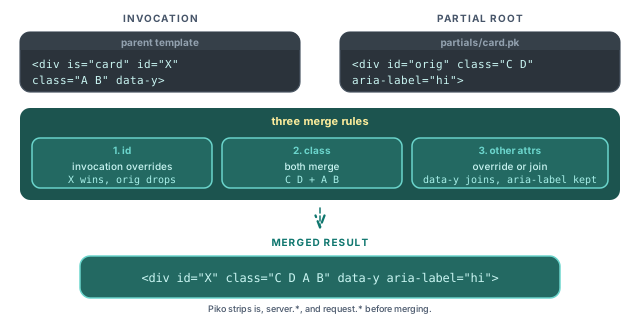
Note: Piko emits merged static attributes in alphabetical order, not source order. The expander sorts the merged set by attribute name before writing it back to the node, so
classalways appears beforeidin the output regardless of how either side wrote them. The example outputs below reflect that order.
Override the id
The invocation's id replaces the partial's id:
<!-- partials/card.pk -->
<template>
    <div id="original-id" class="card">...</div>
</template>

<!-- Invocation -->
<div is="card" id="custom-id"></div>

<!-- Output -->
<div class="card" id="custom-id">...</div>
Piko keeps id overrideable so the parent can produce unique IDs for accessibility (aria-labelledby) or DOM lookups.
Merge classes additively
Classes from the partial and the invocation join into one space-separated list:
<!-- partials/card.pk -->
<template>
    <div class="card base-style">...</div>
</template>

<!-- Invocation -->
<div is="card" class="highlighted special"></div>

<!-- Output -->
<div class="card base-style highlighted special">...</div>
The partial keeps full ownership of its base styles. The parent decorates without rewriting the partial. Class order within the value is partial-first, invocation-second, since mergeClassAttr concatenates the existing value with the new one.
Override or join other attributes
Any other attribute that appears on both the invocation and the partial root takes the invocation's value. Attributes only on one side pass through:
<!-- partials/card.pk -->
<template>
    <div class="card" aria-label="Default label">...</div>
</template>

<!-- Invocation -->
<div is="card" data-testid="my-card" aria-hidden="true"></div>

<!-- Output -->
<div aria-hidden="true" aria-label="Default label" class="card" data-testid="my-card">...</div>
aria-label keeps its partial value because the invocation does not override it. data-testid and aria-hidden pass through. The output order is alphabetical (aria-hidden, aria-label, class, data-testid), driven by rebuildSortedStaticAttrs in partial_expander_task.go.
Attributes Piko consumes
Some attributes never appear on the merged root because Piko routes them somewhere other than the DOM:
is: the partial-invocation marker. The component linker reads it at compile time to resolve which partial to inline, then drops it.server.*: a prop-routing prefix. Piko forwardsserver.names as server-only props to the partial'sPropsstruct, binding them to the matchingprop:"..."field and never emitting the prefix as an attribute. Seepartial_expander.go.request.*: a per-request prop-override prefix.request.names override props for a single request and emit a warning if the named prop does not exist on the partial. Seecomponent_linker_invocation.go.
server. and request. are not generic attribute strip rules. Piko reserves both prefixes to route values into the partial's prop system. If you need a literal server.foo attribute on the rendered DOM, the partial cannot expose it through this path. Emit it directly inside the partial's template instead.
See also
- Template syntax reference for the broader expression and directive surface.
- PK file format reference for partials and props.
- How to scope and bridge component CSS for the styling counterpart of attribute merging.
- How to passing props to partials for typed prop binding.