How to control partial refresh behaviour
piko.partials.reload('name') refreshes a partial via DOM morphing. Most reloads need no configuration - the default merge mode does the right thing for the common case. Reach for the controls below when JS-mutated root attributes, parent CSS scope chains, or runtime initialisation flags need explicit handling. For the directive surface see directives.
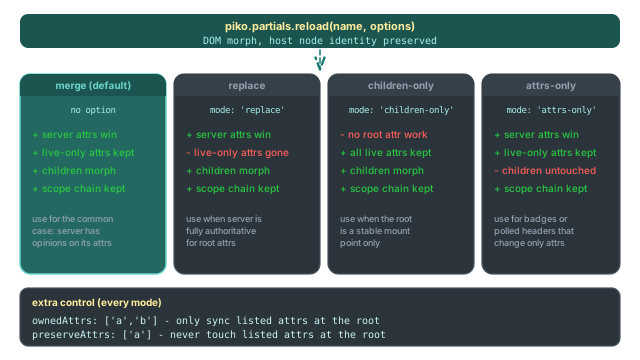
Pick a reload mode
| Scenario | mode |
|---|---|
| Server controls root attrs; JS-set classes/data-* should survive | 'merge' (default) |
| Server fully owns the root, including removing stale attrs | 'replace' |
| Stable container with no root attribute churn | 'children-only' |
| Periodic attribute-only refresh (for example, a status badge) | 'attrs-only' |
The default fits stable containers whose root attributes the server has opinions about. Anything you setAttribute()'d at runtime that the server does not re-emit survives the reload.
piko.partials.reload('cart');
Give the server full authority over the root
When you want the server response to be the complete picture - including removing any attributes that are not in the response:
piko.partials.reload('header-status', { mode: 'replace' });
Use this for partials whose root attributes are 100% server-driven and where lingering client-side attributes would be a bug.
Keep the container; only morph children
For partials where the root element is purely a stable mount point and its attributes never change:
piko.partials.reload('feed', { mode: 'children-only' });
Refresh root attributes without touching children
For polling badges that update a count attribute on the host but should not re-render their subtree:
piko.partials.reload('notification-badge', {
    mode: 'attrs-only',
    args: { since: lastSeen },
});
Tell the server which attributes it owns
When most of the root is JS-mutated and only specific attributes are server-driven:
piko.partials.reload('cart', {
    ownedAttrs: ['data-count', 'class'],
});
Piko copies only data-count and class from the response and keeps every other live attribute, even attributes the server happened to emit.
Preserve specific attributes through a refresh
When most of the root refreshes but a small set of runtime flags must survive:
piko.partials.reload('cart', {
    preserveAttrs: ['data-initialised', 'aria-expanded'],
});
preserveAttrs wins over the server's value even in replace mode.
Preserve a specific child element through a refresh
To freeze an element and its subtree inside the partial, mark it with pk-no-refresh:
<div>
    <span id="score">{{ state.Score }}</span>
    <span id="client-counter" pk-no-refresh data-count="0">0</span>
</div>
To opt a descendant back into morphing inside a pk-no-refresh subtree, add pk-refresh:
<div pk-no-refresh>
    <span>Preserved</span>
    <span pk-refresh>Updates normally</span>
</div>
To preserve only specific attributes on a single element (not the whole element), use pk-no-refresh-attrs on that element:
<div pk-no-refresh-attrs="data-toggled">
    <!-- everything refreshes except data-toggled -->
</div>
These three element-level decorators apply inside the morph. They work in every mode, independent of the partial-root reload mode.
Drive a refresh from JavaScript
Pass query params to the partial during a reload:
piko.partials.reload('cart', { args: { highlight: 'new-item' } });
Combine mode and args:
piko.partials.reload('cart', {
    args: { highlight: 'new-item' },
    mode: 'replace',
    preserveAttrs: ['data-client-mounted'],
});
Style the loading state
Piko adds the pk-loading class to the partial element while the refresh runs, then removes it when the response replaces the content:
.pk-loading {
    opacity: 0.6;
    pointer-events: none;
}
Opt a form out of dirty tracking
Search and filter forms do not benefit from the unsaved-changes warning. To opt out, add pk-no-track:
<form pk-no-track p-on:submit.prevent="action.search()">
    <input type="text" name="query" />
    <button type="submit">Search</button>
</form>
See also
- Directives reference for the directive list and the full set of internal
pk-*attributes. - Template syntax reference for the expression grammar.
- How to scope and bridge component CSS for how scope chains travel through the refresh.
- How to passing props to partials for the prop-binding side of partial composition.