Client components
A .pkc file is a client-side reactive component that compiles to a native Web Component with shadow DOM encapsulation. This page documents the file format and the runtime surface. For task recipes see the reactivity how-to and events how-to.
File structure
A .pkc file has three sections: <template>, <script lang="ts">, and <style>.
<template name="pp-counter">
    <div>
        <p>Count: {{ state.count }}</p>
        <button p-on:click="increment">Increment</button>
    </div>
</template>

<script lang="ts">
    const state = {
        count: 0 as number,
    };

    function increment() {
        state.count++;
    }
</script>

<style>
    div { padding: 1rem; border: 1px solid #eee; }
</style>
Template attributes
| Attribute | Values | Purpose |
|---|---|---|
name | kebab-case custom element name | Required. Defines the registered tag (for example pp-counter). Must contain a hyphen per the Web Components specification. |
enable | "form" | Opts into form association; the component exposes itself as a form control. |
enable | "animation" | Opts into the animation timeline behaviour required by p-timeline:hidden. |
The enable attribute accepts a single value. Components that need both behaviours can declare them by listing both names separated by whitespace (enable="form animation").
Project components use the reserved pp- prefix to avoid collisions with built-in and third-party custom elements.
Script attributes
| Attribute | Values | Purpose |
|---|---|---|
lang | "ts" | Required. The script is TypeScript. |
Runtime roots in scope
A reactive <script lang="ts"> block in a PKC file has three runtime roots available without import:
| Root | Source | Purpose |
|---|---|---|
pkc | alias for this, injected by the compiler | the component element itself, plus its lifecycle hooks (pkc.onConnected, pkc.onDisconnected, pkc.onBeforeRender, pkc.onAfterRender, pkc.onUpdated, pkc.onCleanup) and the standard component DOM API |
piko | global ambient namespace | runtime helpers: piko.bus, piko.event, piko.nav, piko.form, piko.ui, piko.actions, piko.helpers, piko.assets, piko.loader, piko.modal, piko.network, piko.partial, piko.partials, piko.sse, piko.timing, piko.util, piko.trace, piko.autoRefreshObserver, piko.context, piko.hooks, piko.analytics |
action | generated actions.gen.ts | typed server actions, called as action.<package>.<Name>(input).call() |
Reactive state
A const state = { ... } declaration inside <script> defines the reactive scope. Writes to its properties trigger a re-render. Arrays and objects nested in state are also reactive: push, splice, and property assignment all trigger updates.
const state = {
    count: 0 as number,
    name: 'Guest' as string,
    is_active: false as boolean,
    items: [] as string[],
    user: null as { name: string; email: string } | null,
};
Variables declared outside the state object are not reactive: a let count = 0 outside state compiles and mutates but does not trigger re-renders.
Naming and attribute mapping
State field names map to HTML attributes through propertyToAttributeName:
| Field name | Reflected attribute |
|---|---|
is_active | is_active |
itemCount | item-count |
count | count |
snake_case field names round-trip without transformation. camelCase field names lower to kebab-case attribute names. Components in components/m3e/ use camelCase for historical reasons.
For the rationale see about reactivity.
Type annotations
Each state field carries an as TypeName annotation. The compiler reads the annotation to emit a static propTypes getter, which the runtime uses to coerce attribute strings back to typed values. Authors must annotate fields when the initialiser is null (ambiguous between null | number and null | string). Annotations are optional when the initialiser is itself typed ('Hello' infers String, 0 infers Number, false infers Boolean). The convention is to annotate every field for clarity.
State and HTML attribute binding
The runtime binds state bidirectionally to the host element's HTML attributes:
| Direction | Trigger | Behaviour |
|---|---|---|
| State -> attribute | Writing a state field (state.value = 'x') | The runtime calls host.setAttribute(field, 'x') (or host.toggleAttribute for booleans, or host.removeAttribute for null/undefined). |
| Attribute -> state | External code calls setAttribute/toggleAttribute/removeAttribute on the element, or the page initially carries the attribute | The runtime coerces the attribute string back to the field's declared type and writes it to state, triggering a re-render. |
Sync flags (applyingToState, reflectingToAttribute, initialising) prevent loops. A state-write-then-attribute-write does not trigger another state-write.
Reflection scope. Only primitive types auto-reflect: string, number, boolean. Arrays, objects, and JSON-typed fields stay internal unless explicitly opted in via the metadata system.
Boolean semantics. Attribute presence is the truth signal:
| Attribute form | Coerced state value |
|---|---|
<x flag> | true |
<x flag="true"> | true |
<x flag="anything"> | true |
<x flag="false"> | false |
<x> (attribute absent) | false |
Writing state.flag = false removes the attribute via host.toggleAttribute. The DOM never carries flag="false".
Null semantics. Writing null or undefined to any state field removes the attribute. A field declared as string | null round-trips null faithfully. A non-nullable field falls back to its default when the attribute is absent.
This binding is the primary inter-component communication channel. A PKC drives another PKC by calling setAttribute on it. A .pk script drives any PKC the same way. See about reactivity for the design rationale.
Props
There is no separate const props declaration. Reactive state declared in const state = { ... } is the single source for both internal mutable values and externally driven props. The compiler reads each field's as Type annotation and emits a static propTypes getter. The runtime uses that getter to coerce attribute strings to typed values when external code calls setAttribute on the host element.
const state = {
    label: '' as string,
    variant: 'primary' as 'primary' | 'secondary',
    is_disabled: false as boolean,
};
Parent templates pass values through plain HTML attributes:
<pp-button label="Save" variant="primary" is_disabled></pp-button>
Primitive-typed state fields (string, number, boolean) reflect bidirectionally to HTML attributes via the binding described in State and HTML attribute binding. Arrays, objects, and JSON-typed fields stay internal unless opted in via the metadata system.
Directives
.pkc templates support the directives described below. See the directives reference for full syntax.
| Directive | Behaviour |
|---|---|
p-if, p-else-if, p-else | Conditional rendering. |
p-show | Toggle CSS display without removing from the DOM. |
p-for | Iterate; pair with p-key for stable identity. |
p-on:<event> | Attach an event listener. |
p-model | Two-way binding on form inputs. |
p-bind:<attr> or :<attr> | Attribute binding. |
p-text | Text content. |
p-html | Raw HTML (unsafe). |
p-class | Dynamic class list. |
p-style | Dynamic inline style. |
p-ref | Create a ref to a child element. |
Lifecycle hooks
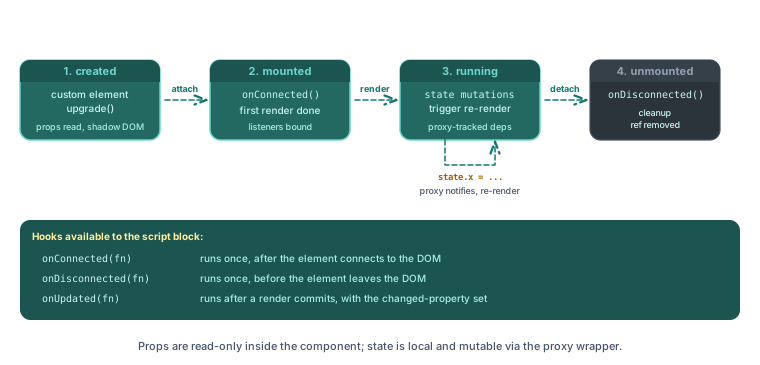
Register lifecycle callbacks by calling registration methods on pkc inside the <script> body. Every hook is optional and additive. Calling the same registration method multiple times queues multiple callbacks that all fire in order.
| Hook | Fires |
|---|---|
pkc.onConnected(callback) | After the custom element connects to the DOM. Once per mount cycle. |
pkc.onDisconnected(callback) | When the element leaves the DOM. Resets so a re-mount fires onConnected again. |
pkc.onBeforeRender(callback) | Immediately before each re-render. |
pkc.onAfterRender(callback) | Immediately after each re-render finishes. |
pkc.onUpdated(callback) | After a re-render commits when one or more reactive properties changed. The callback receives Set<string> of changed property paths. |
pkc.onCleanup(callback) | After onDisconnected callbacks have run. Cleanups run once and the runtime clears the queue. |
pkc.onConnected(() => {
    window.addEventListener('scroll', handleScroll);
    handleScroll();
});

pkc.onDisconnected(() => {
    window.removeEventListener('scroll', handleScroll);
});

pkc.onUpdated((changedProperties) => {
    if (changedProperties.has('count')) {
        piko.bus.emit('counter:changed', { count: state.count });
    }
});
Slots
Slot APIs available on pkc (the host element):
| Method | Returns | Purpose |
|---|---|---|
pkc.getSlottedElements(slot_name?) | Element[] | Returns elements assigned to the named slot, or the default slot when the caller omits the name. Returns [] before the shadow root attaches. |
pkc.attachSlotListener(slot_name, callback) | void | Registers a callback that fires whenever the slot's assigned content changes. The callback receives the live array of assigned elements and fires once immediately with the current content. |
pkc.hasSlotContent(slot_name?) | boolean | Returns whether the slot has any assigned elements. |
pkc.attachSlotListener('', (elements) => {
    for (const tab of elements) {
        tab.toggleAttribute('selected', tab.getAttribute('value') === state.active);
    }
});
A PKC drives its slotted children by setting their HTML attributes. When a slotted element is itself a PKC, those attribute writes feed through to its reactive state via the binding described in State and HTML attribute binding.
Events
| API | Surface |
|---|---|
pkc.setAttribute(name, value) / pkc.toggleAttribute(name, force?) | Writes an HTML attribute on the host element. Feeds through to the target component's reactive state via the bidirectional binding. |
piko.event.dispatch(target, name, detail?, options?) | Dispatches a DOM CustomEvent from target (an element, CSS selector, or p-ref name). Bubbles by default. |
piko.bus.emit(name, detail?) / piko.bus.on(name, handler) / piko.bus.once(...) / piko.bus.off(name?) | Global pub/sub bus, decoupled from the DOM. |
piko.event.dispatch(this, 'pp-counter:change', { count: state.count });
piko.bus.emit('cart:updated', { item_count: 3 });
For when to choose each surface, see about reactivity.
Shadow DOM and styling
The compiler scopes <style> to the shadow root by default. Styles do not leak out, and outer page styles do not leak in.
| Selector | Scope |
|---|---|
div { ... } | Only matches inside the shadow root. |
:host { ... } | The component's host element. |
:host(.active) { ... } | The host element when it carries the matching class. |
::slotted(<selector>) { ... } | Matches elements projected through slots. |
Form association
Add enable="form" to the <template> to participate in forms. The component then responds to:
form.elements[name]lookup.- Validation (
checkValidity(),reportValidity()). formdatasubmission.resetevents.
Inside the component, call piko.form.setValues(formSelector, values) to set form field values programmatically. Pass either a CSS selector or an HTMLFormElement plus a record of field names to values.
piko.form.setValues('#edit-user', {
    name: 'John Doe',
    email: '[email protected]',
});
Registration
The CLI scans the project's components/ directory by default. The compiler picks up locally authored .pkc files automatically. piko.WithComponents registers components shipped by external Go modules.
ssr := piko.New(
    piko.WithComponents(
        piko.ComponentDefinition{
            TagName:    "pp-counter",
            SourcePath: "components/pp-counter.pkc",
            ModulePath: "github.com/myorg/piko-components",
            IsExternal: true,
        },
    ),
)
ComponentDefinition fields:
| Field | Purpose |
|---|---|
TagName | The HTML custom element tag name. Must contain a hyphen per the Web Components specification. |
SourcePath | Path to the .pkc source file. Project-relative for local components, or module-relative for external components. |
ModulePath | Go module path that provides the component. Empty for local components. Required for external ones. |
AssetPaths | Module-root-relative directories whose files the registry should seed alongside the PKC sources. |
IsExternal | Whether the component came from WithComponents instead of auto-discovery from the local components/ folder. |
See also
- How to reactivity.
- How to events.
- How to event bus for cross-component messaging.
- Directives reference.
- Scenario 003: reactive counter, Scenario 007: todo app, Scenario 009: form wizard.
Integration tests: tests/integration/pkc_serving/, tests/integration/asset_pipeline/.