Directives
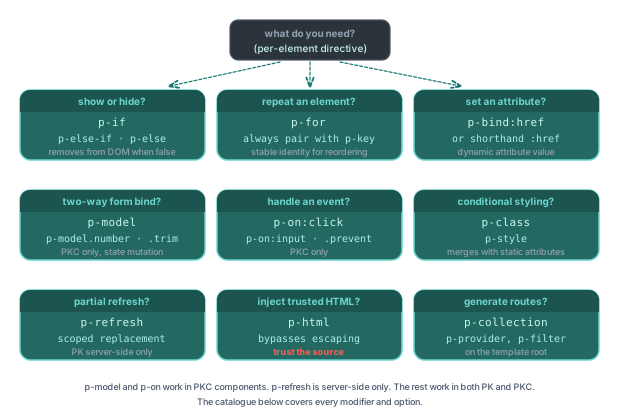
Directives are attributes that control rendering, handle events, bind data, and add behaviour to elements in a PK template. This page enumerates every directive Piko ships.
Conditional rendering
For task patterns using the conditional directives, see the conditionals how-to and loops how-to.
p-if
Conditionally renders an element based on a boolean expression. When the condition is false the runtime removes the element from the DOM.
<template>
  <div>
    <p p-if="state.IsLoggedIn">Welcome back!</p>
    <p p-if="!state.IsLoggedIn">Please log in.</p>
  </div>
</template>
The expression accepts comparison (>, <, ==), equality, logical conjunction (&&), disjunction (||), and negation (!).
p-else-if and p-else
Chain mutually exclusive conditions to a preceding p-if. p-else-if and p-else must immediately follow a p-if or another p-else-if at the same nesting level. Only the first matching branch renders.
<template>
  <div class="status-indicator">
    <p p-if="state.Status == 'ok'">Everything is running smoothly</p>
    <p p-else-if="state.Status == 'warning'">Warning: Check system logs</p>
    <p p-else-if="state.Status == 'error'">Error: System malfunction</p>
    <p p-else>Status unknown</p>
  </div>
</template>
p-show
Toggles element visibility through the CSS display property. The element remains in the DOM and its event listeners, focus state, and form values persist across toggles. p-if instead removes and recreates the element.
<template>
  <div p-show="state.IsExpanded" class="details-panel">
    Detailed content here
  </div>
</template>
Loops
p-for
Iterates over a slice, array, or map. The directive accepts two syntactic forms.
Value-only form:
<template>
  <ul>
    <li p-for="item in state.Items" p-key="item.ID">{{ item.Name }}</li>
  </ul>
</template>
Index and value form:
<template>
  <ul>
    <li p-for="(idx, item) in state.Items" :data-index="idx">
      Item {{ idx + 1 }}: {{ item }}
    </li>
  </ul>
</template>
The blank identifier _ discards the index: (_, item) in state.Items.
For maps, the binding form is (key, value). Map iteration order is deterministic (sorted by key).
<template>
  <dl>
    <div p-for="(key, value) in state.Config" p-key="key">
      <dt>{{ key }}</dt>
      <dd>{{ value }}</dd>
    </div>
  </dl>
</template>
p-key
Provides a unique identifier for list items so the renderer can reconcile DOM nodes when items enter, leave, or reorder.
<template>
  <ul>
    <li p-for="item in state.Items" p-key="item.ID">{{ item.Name }}</li>
  </ul>
</template>
The key expression resolves to a value derived from the iterated item, such as a struct field, a string, a computed expression, or a method call.
p-memo (PKC only)
Declares the values a row renders from. While none of those values change, the client renderer skips the whole props walk and child diff for that row. The directive sets the reserved _memo prop, which the renderer reads and never writes to the DOM.
This tells the client-side reconciler what to skip, so it only applies to .pkc components. The server renders a .pk page and never runs the vdom diff, so p-memo does nothing there.
<template>
  <ul>
    <li p-for="row in state.Rows" p-key="row.ID" p-memo="row">{{ row.Label }}</li>
  </ul>
</template>
Pass an array when a row reads from more than one source, such as p-memo="[row, state.SelectedID]". The renderer compares dependencies by reference, one array item at a time, so replace objects instead of changing them in place.
The dependencies must cover every non-static value the row renders. A missing dependency can leave a field wrong forever, not just late. Do not use p-memo on rows containing controlled inputs, because the skipped patch also skips setting value and checked again.
For the full contract and a way to verify skipping, see the keyed-row memoisation how-to.
Event handling
p-on
Attaches an event handler to an element. The handler dispatches to one of three targets based on the prefix of the expression.
| Prefix | Target |
|---|---|
| (none) | Exported function from the page-local <script> block |
action. | Registered server action |
helpers. | Framework helper function |
<template>
  <button p-on:click="handleClick()">Click Me</button>
  <button p-on:click="action.deleteUser(state.UserID)">Delete</button>
  <form p-on:submit.prevent="handleSubmit(event)">...</form>
</template>
Event modifiers append to the event name with a dot:
| Modifier | Effect |
|---|---|
.prevent | Calls event.preventDefault() before the handler |
.stop | Calls event.stopPropagation() before the handler |
.once | Handler fires only on the first event |
.self | Handler fires only when event.target === event.currentTarget |
.passive | Registers the listener with { passive: true } |
.capture | Registers the listener in the capture phase |
Reserved identifiers in handler bodies
Two synthetic identifiers are available inside p-on and p-event handler expressions:
| Identifier | Type | Purpose |
|---|---|---|
$event | the DOM Event (or CustomEvent) | The triggering event object. The annotator also accepts the bareword event as an alias. |
$form | the surrounding <form> element, or the form-associated host | The form element related to the event target. Action calls such as action.users.Submit($form) consume the serialised form data. |
Using $event outside a handler is a compile error. The analyser reports $event can only be used in p-on or p-event handlers.
<form p-on:submit.prevent="action.users.Submit($form)">...</form>
<input p-on:input="onInput($event)" />
p-event
Attaches a handler for a custom DOM event dispatched by a child component. The handler dispatches with the same prefix scheme as p-on: a bare identifier resolves to a script function, action. resolves to a registered server action, and helpers. resolves to a framework helper.
<template>
  <my-component p-event:update="onUpdate($event)"></my-component>
  <my-component p-event:save="action.handleSave($form)"></my-component>
</template>
Text and HTML binding
p-text
Sets the text content of an element. Content is HTML-escaped before insertion.
<template>
  <p p-text="state.Message"></p>
  <span p-text="state.Count"></span>
</template>
p-text and {{ }} interpolation produce equivalent output. p-text accepts the entire content as a single expression. {{ }} accepts mixed static and dynamic fragments.
p-html
Renders the expression's string value as raw HTML, bypassing escaping.
<template>
  <div p-html="state.SafeHTML"></div>
</template>
The directive bypasses HTML escaping. Content originating from untrusted sources can introduce cross-site scripting. The html standard library provides html.EscapeString for escaping individual values. The typical input comes from a renderer that sanitises its output (Markdown, rich-text editor).
Attribute binding
:attribute (shorthand)
Binds an expression to an HTML attribute. The shorthand is the colon prefix on the attribute name.
<template>
  <a :href="state.Link">{{ state.LinkText }}</a>
  <img :src="state.ImageURL" :alt="state.ImageAlt" :width="state.Width" />
</template>
The binding accepts data attributes (:data-id), ARIA attributes (:aria-label), boolean attributes (:disabled, :checked, :readonly, :required), and inline styles (:style).
p-bind
The explicit form of attribute binding, equivalent to the colon shorthand.
<template>
  <a p-bind:href="state.Link">Link</a>
  <button p-bind:disabled="state.IsProcessing">Submit</button>
</template>
p-class
Applies CSS classes through an object expression. Each key is a class name. Each value is the boolean condition that toggles the class.
<template>
  <div p-class="{ 'text-primary': state.IsPrimary, 'border-accent': state.IsHighlighted }">
    Styled content
  </div>
</template>
p-style
Applies inline styles through an object expression. Keys are CSS property names in camelCase. Values are the property values.
<template>
  <div p-style="{ backgroundColor: state.BgColour, fontSize: state.FontSize + 'px' }">
    Styled content
  </div>
</template>
Form binding
p-model
Establishes two-way binding between a form input and a Response field. The input value tracks the field. User edits update the field on the next request cycle.
<template>
  <form>
    <input type="text" p-model="state.Username" />
    <input type="email" p-model="state.Email" />
    <input type="number" p-model="state.Quantity" min="1" />
    <textarea p-model="state.Message"></textarea>
  </form>
</template>
Element references
p-ref
Names an element so client-side script can address it through the pk.refs object.
<template>
  <input p-ref="searchInput" type="text" />
  <button p-on:click="focusSearch()">Focus Search</button>
</template>

<script>
function focusSearch() {
  pk.refs.searchInput.focus();
}
</script>
Collection binding
For p-collection, p-provider, and p-param, see Collections. The p-param attribute names the route placeholder used to look up the current item. The default is slug.
p-collection-source
Names a Go import alias that supplies the module-content collection backing this page. The collection service reads the alias to resolve the source package whose published items drive route generation. The attribute lives on the <template> element alongside p-collection.
<template p-collection="docs" p-collection-source="docs_pkg">
  <piko:content />
</template>

<script type="application/x-go">
package main

import docs_pkg "github.com/example/site-docs/content"
</script>
Piko matches the value against imports in the page's Go script block:
- A named import matches only by its name.
import docs_pkg "github.com/example/site-docs/content"matchesdocs_pkg, notcontent. - An unnamed import matches by the last element of its path. Piko skips a trailing major-version element, so
import "github.com/example/docs/v2"matchesdocs. - Blank (
_) and dot (.) imports never match.
A value that matches no import fails the build with diagnostic T155, reported at the <template> tag. Piko does not fall back to the page's local content when source resolution fails.
The accessors that consume this attribute are HasCollectionSource() and GetCollectionSource() on *sfcparser.ParseResult. See internal/sfcparser/dto.go.
Partials and slots
Piko has two distinct slot mechanisms. The right one depends on whether you are filling a slot in a PK partial or in a PKC custom element.
| Target | Slot definition | Slot projection |
|---|---|---|
PK partial (<my-partial> invocation in a .pk file) | <piko:slot name="..."> or <slot name="..."> inside the partial template | p-slot="..." or the standard HTML slot="..." attribute on a child element |
PKC component (<m3e-card>, <piko-card>, <pp-button>, and so on) | <slot name="..."> inside the PKC <template> (real Web Component slot) | The standard HTML slot="..." attribute on a child element. p-slot and <piko:slot> are not used here |
p-slot (PK partials only)
Inside a PK partial invocation, names the slot in the parent partial that receives the marked element.
<my-partial>
  <div p-slot="header"><h1>Page Title</h1></div>
  <div p-slot="body"><p>Body content goes here.</p></div>
</my-partial>
The slot name must match a <piko:slot name="..."> or <slot name="..."> element in the partial's template. Content without p-slot flows into the default (unnamed) slot.
Projecting into a PKC slot
PKC components are real Web Components. Use plain HTML slot="..." attributes:
<piko-card>
  <h3 slot="header">Card title</h3>
  <p>Default-slot body content.</p>
  <div slot="footer">Footer content</div>
</piko-card>
Inside the PKC <template> you place named <slot> elements (<slot name="header">, <slot name="footer">) and the unnamed <slot> for default content.
Animation timelines (PKC only)
p-timeline
The p-timeline directive controls animation timeline behaviour. Supported only in PKC files that opt into animation features (enable="animation").
The currently documented argument is :hidden, which marks an element as hidden until an animation timeline reveals it.
<h1 p-ref="title" p-timeline:hidden>Hello, Piko</h1>
The compiler rewrites the attribute to p-timeline-hidden in the output. CSS keeps the element hidden until the timeline's show action runs.
Key scoping
p-context
Declares a key-namespace boundary. Inside the boundary, p-key values resolve relative to the context, allowing two sections of a template to share a key without colliding. The expression resolves to a string.
<template>
  <section p-context="'user-profile'">
    <article p-key="'details'">...</article>
  </section>
  <section p-context="'order-summary'">
    <article p-key="'details'">...</article>
  </section>
</template>
For task patterns, see the key scoping how-to.
Framework-internal directives
The compiler emits these directives. They do not appear in authored templates.
| Directive | Purpose |
|---|---|
p-scaffold | Marker used by the compiler when generating component structure. |
p-fragment, p-fragment-id | Emitted by the partial expander to group root nodes from a multi-root partial. |
Quick reference
Conditional directives
| Directive | Example |
|---|---|
p-if | <div p-if="state.Show">...</div> |
p-else-if | <div p-else-if="state.Other">...</div> |
p-else | <div p-else>...</div> |
p-show | <div p-show="state.Visible">...</div> |
Loop directives
| Directive | Example |
|---|---|
p-for | <li p-for="item in state.Items">{{ item }}</li> |
p-for (with index) | <li p-for="(i, item) in state.Items">{{ i }}: {{ item }}</li> |
p-key | <li p-for="item in items" p-key="item.ID">...</li> |
p-memo (PKC only) | <li p-for="row in rows" p-key="row.ID" p-memo="row">...</li> |
Event directives
| Directive | Example |
|---|---|
p-on:event | <button p-on:click="handleClick()">Click</button> |
p-on:event (action) | <button p-on:click="action.deleteItem()">Delete</button> |
p-on:event.prevent | <form p-on:submit.prevent="handleSubmit(event)">...</form> |
p-event:name | <my-widget p-event:update="onUpdate()">...</my-widget> |
Binding directives
| Directive | Example |
|---|---|
:attr | <a :href="state.Link">Link</a> |
p-bind:attr | <a p-bind:href="state.Link">Link</a> |
p-text | <p p-text="state.Message"></p> |
p-html | <div p-html="state.TrustedHTML"></div> |
p-model | <input p-model="state.Username" /> |
p-class | <div p-class="{ active: state.IsActive }">...</div> |
p-style | <div p-style="{ color: state.TextColour }">...</div> |
p-ref | <input p-ref="searchInput" /> |
Collection directives
| Directive | Example |
|---|---|
p-collection | <template p-collection="blog">...</template> |
p-collection-source | <template p-collection="docs" p-collection-source="docs_pkg"> |
p-provider | <template p-collection="blog" p-provider="markdown"> |
p-param | <template p-collection="blog" p-param="id"> |
Partials and animation directives
| Directive | Example |
|---|---|
p-slot | <div p-slot="header">...</div> |
p-timeline:hidden | <h1 p-timeline:hidden>...</h1> |
Key scoping directives
| Directive | Example |
|---|---|
p-context | <section p-context="'user-profile'">...</section> |
See also
- Template syntax reference for the expression language used inside directive values.
- PK file format reference for the surrounding file structure.
- How to conditionals, how to loops, and how to memoise keyed rows for task recipes.
- How to control component attribute merging, how to scope and bridge component CSS, and how to control partial refresh behaviour.
- Scenario 004: product catalogue for directives in action.