Shipping a real site
In this tutorial we build a deployable blog. It includes a shared layout, markdown-driven post pages with a table of contents, a post index, and a newsletter signup that uses the layout's footer slot. By the end you have a single-binary build ready to copy to a server.
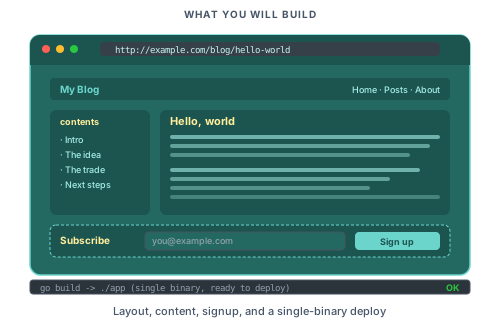
You should have completed Your first page, Adding interactivity, and Server actions and forms.
Step 1: Refresh the layout partial
Replace partials/layout.pk with:
<template>
    <header class="site-header">
        <piko:a href="/" class="brand">{{ state.CompanyName }}</piko:a>
        <nav>
            <piko:a href="/">Home</piko:a>
            <piko:a href="/about">About</piko:a>
            <piko:a href="/blog">Blog</piko:a>
        </nav>
    </header>

    <main>
        <piko:slot />
    </main>

    <footer>
        <p>Built with Piko.</p>
        <piko:slot name="footer" />
    </footer>
</template>

<script type="application/x-go">
package main

import "piko.sh/piko"

type Props struct {
    CompanyName     string `prop:"company_name"`
    CurrentPage     string `prop:"current_page"`
    PageTitle       string `prop:"page_title"`
    PageDescription string `prop:"page_description"`
}

type Response struct {
    CompanyName     string
    CurrentPage     string
    PageTitle       string
    PageDescription string
}

func Render(r *piko.RequestData, props Props) (Response, piko.Metadata, error) {
    return Response{
        CompanyName:     props.CompanyName,
        CurrentPage:     props.CurrentPage,
        PageTitle:       props.PageTitle,
        PageDescription: props.PageDescription,
    }, piko.Metadata{}, nil
}
</script>

<style>
    body { font-family: system-ui, sans-serif; max-width: 768px; margin: 0 auto; padding: 2rem; }
    .site-header { display: flex; justify-content: space-between; padding-bottom: 1rem; border-bottom: 1px solid #e5e7eb; }
    .brand { font-weight: 700; text-decoration: none; color: inherit; }
    nav { display: flex; gap: 1rem; }
    footer { margin-top: 4rem; padding-top: 1rem; border-top: 1px solid #e5e7eb; color: #6b7280; }
</style>
Reload any existing page. The Props shape matches tutorial 01 so every earlier page keeps working with the new header.
For slots and nested layouts see how to partials/layout. For the directive grammar see directives reference.
Step 2: Create a markdown collection for posts
Blog posts live under content/blog/. Create content/blog/hello-world.md:
---
title: Hello, world
slug: hello-world
date: 2026-01-15
author: Alice Smith
description: A short first post to prove the blog works.
---

# Hello, world

This is the first post on the blog. It is written in **markdown** and rendered by Piko.

## Why a blog?

A blog is a good first real-world Piko project. It exercises routing, collections, layouts, metadata, and content rendering without requiring external services.

## What comes next

The next post will cover how Piko renders this very content.
Add one or two more posts with the same shape.
Step 3: Create the post page
Create pages/blog/{slug}.pk:
<template p-collection="blog" p-provider="markdown">
    <piko:partial is="layout">
        <article>
            <header>
                <h1 p-text="state.Title"></h1>
                <p class="byline">
                    By <span p-text="state.Author"></span> on <span p-text="state.Date"></span>
                </p>
            </header>

            <aside p-if="len(state.TOC) > 0" class="toc">
                <h2>Contents</h2>
                <ol>
                    <li p-for="section in state.TOC" p-key="section.Slug">
                        <a :href="'#' + section.Slug" p-text="section.Title"></a>
                    </li>
                </ol>
            </aside>

            <main class="post-body">
                <piko:content />
            </main>
        </article>
    </piko:partial>
</template>

<script type="application/x-go">
package main

import (
    "piko.sh/piko"
    layout "myapp/partials/layout.pk"
)

type Post struct {
    Title       string `json:"title"`
    Slug        string `json:"slug"`
    Date        string `json:"date"`
    Author      string `json:"author"`
    Description string `json:"description"`
}

type Response struct {
    Title       string
    Slug        string
    Date        string
    Author      string
    Description string
    TOC         []piko.SectionNode
}

func Render(r *piko.RequestData, props piko.NoProps) (Response, piko.Metadata, error) {
    post := piko.GetData[Post](r)
    toc := piko.GetSectionsTree(r, piko.WithMinLevel(2), piko.WithMaxLevel(3))

    return Response{
        Title:       post.Title,
        Slug:        post.Slug,
        Date:        post.Date,
        Author:      post.Author,
        Description: post.Description,
        TOC:         toc,
    }, piko.Metadata{
        Title:        post.Title + " | MyBlog",
        Description:  post.Description,
        CanonicalURL: "https://myblog.example.com/blog/" + post.Slug,
    }, nil
}
</script>

<style>
    .byline { color: #6b7280; font-style: italic; }
    .toc { background: #f9fafb; padding: 1rem; border-radius: 0.5rem; margin: 1.5rem 0; }
    .toc ol { margin: 0; padding-left: 1.5rem; }
    .post-body { line-height: 1.7; }
    .post-body h2 { margin-top: 2rem; }
</style>
Run go run ./cmd/generator/main.go all and visit http://localhost:8080/blog/hello-world. The post title, byline, a table of contents listing the H2/H3 headings, and the rendered markdown body all appear. Each post gets its own URL derived from its slug frontmatter.
For GetData, GetSectionsTree, <piko:content />, and how the markdown collection routes at build time see collections API reference and about collections. For the Metadata fields see metadata fields reference.
Step 4: Build the post index
pages/blog/index.pk lists every post. The listing page uses piko.GetAllCollectionItems:
<template>
    <piko:partial is="layout">
        <h1>All posts</h1>
        <article p-for="post in state.Posts" p-key="post.Slug" class="post-summary">
            <h2>
                <a :href="'/blog/' + post.Slug" p-text="post.Title"></a>
            </h2>
            <p class="byline">By {{ post.Author }} on {{ post.Date }}</p>
            <p p-text="post.Description"></p>
        </article>
    </piko:partial>
</template>

<script type="application/x-go">
package main

import (
    "sort"

    "piko.sh/piko"
    layout "myapp/partials/layout.pk"
)

type PostSummary struct {
    Title       string
    Slug        string
    Date        string
    Author      string
    Description string
}

type Response struct {
    Posts []PostSummary
}

func Render(r *piko.RequestData, props piko.NoProps) (Response, piko.Metadata, error) {
    raw, err := piko.GetAllCollectionItems("blog")
    if err != nil {
        return Response{}, piko.Metadata{}, err
    }

    posts := make([]PostSummary, 0, len(raw))
    for _, item := range raw {
        posts = append(posts, PostSummary{
            Title:       stringOr(item, "title"),
            Slug:        stringOr(item, "slug"),
            Date:        stringOr(item, "date"),
            Author:      stringOr(item, "author"),
            Description: stringOr(item, "description"),
        })
    }

    sort.Slice(posts, func(i, j int) bool {
        return posts[i].Date > posts[j].Date
    })

    return Response{Posts: posts}, piko.Metadata{
        Title:       "Blog",
        Description: "Recent posts from MyBlog.",
    }, nil
}

func stringOr(item map[string]any, key string) string {
    if v, ok := item[key].(string); ok {
        return v
    }
    return ""
}
</script>

<style>
    .post-summary { padding: 1rem 0; border-bottom: 1px solid #f3f4f6; }
    .post-summary:last-child { border-bottom: none; }
    .byline { color: #6b7280; font-size: 0.9rem; }
</style>
Visit http://localhost:8080/blog/. The index shows each post by date descending.
For querying, filtering, and pagination see how to querying and filtering collections.
Step 5: Add a newsletter signup
Create actions/newsletter/subscribe.go:
package newsletter

import (
    "net/mail"

    "piko.sh/piko"
)

type SubscribeInput struct {
    Email string `json:"email" validate:"required,email"`
}

type SubscribeResponse struct {
    OK bool `json:"ok"`
}

type SubscribeAction struct {
    piko.ActionMetadata
}

func (a *SubscribeAction) Call(input SubscribeInput) (SubscribeResponse, error) {
    if _, err := mail.ParseAddress(input.Email); err != nil {
        return SubscribeResponse{}, piko.ValidationField("email", "Enter a valid email address.")
    }

    a.Response().AddHelper("showToast", "Subscribed. Thanks for signing up.", "success")

    return SubscribeResponse{OK: true}, nil
}
Run go run ./cmd/generator/main.go all to regenerate the dispatch code.
Drop the form into the layout's footer slot. Update any page (or create a reusable partial for the signup form):
<piko:partial is="layout">
    <!-- page content -->

    <form p-slot="footer" id="newsletter-form" p-on:submit.prevent="subscribe($event, $form)" class="signup">
        <label>
            Get new posts by email
            <input type="email" name="email" required />
        </label>
        <button type="submit">Subscribe</button>
    </form>
</piko:partial>
<script lang="ts">
async function subscribe(event: SubmitEvent, form: FormDataHandle): Promise<void> {
    await action.newsletter.Subscribe(form).call();
}
</script>
The toasts module was already enabled in tutorial 03, so cmd/main/main.go requires no change.
After go run ./cmd/generator/main.go all, reload /blog/hello-world. The footer slot now carries a signup form that POSTs through an action. Submit a valid address and a success toast appears. Submit an invalid one and the field error renders under the input.
For the full list of action lifecycle and form helpers see server actions reference.
Step 6: Add a sitemap
Add sitemap and robots.txt generation. Extend cmd/main/main.go with WithSEO alongside the options the earlier tutorials added:
ssr := piko.New(
    piko.WithCSSReset(piko.WithCSSResetComplete()),
    piko.WithDevWidget(),
    piko.WithDevHotreload(),
    piko.WithMonitoring(),
    piko.WithFrontendModule(piko.ModuleToasts),
    piko.WithSEO(piko.SEOConfig{
        Sitemap: piko.SitemapConfig{
            Hostname: "https://myblog.example.com",
        },
    }),
)
The hostname lives at Sitemap.Hostname, not at the top of SEOConfig. The same struct also exposes Robots for robots.txt rules, plus Enabled if you want to gate generation behind a flag.
Restart the server and visit /sitemap.xml. Every collection route appears in the index.
For the full SEO surface see bootstrap options reference.
Step 7: Build the production binary
piko build -o myblog
piko build runs the generator, then compiles the binary with the piko_embed build tag so the manifest, pages, and assets are embedded. The manual equivalent is go run ./cmd/generator/main.go all followed by CGO_ENABLED=0 go build -tags piko_embed -o myblog ./cmd/main; without the tag the binary reads dist/ and .piko/ from disk instead.
The binary is self-contained. Copy it to the server and run:
./myblog prod
Put a reverse proxy (Caddy, nginx, Cloudflare) in front for TLS termination.
For production builds, monitoring, analytics, and CSS tree-shaking see how to production build, how to analytics, and bootstrap options reference.
Where to next
- Next tutorial: Data-backed pages with the querier adds a real database; Going multilingual translates the blog.
- Reference: Bootstrap options reference, collections API reference, metadata fields reference.
- Explanation: About PK files, About collections, About SSR.
- How-to: Production build, TLS, Configuration philosophy, partials/layout.
- Runnable source:
examples/scenarios/005_blog_with_layout/andexamples/scenarios/015_markdown_blog/.