Going multilingual
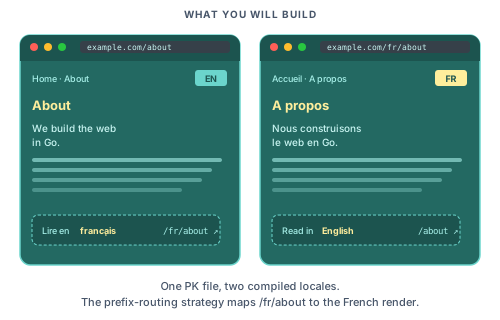
In this tutorial we will add French to the blog from Shipping a real site. Visitors will reach /about in English and /fr/about in French, with localised navigation, metadata, and post bodies.
You should have completed Shipping a real site first. The querier and testing tutorials are not prerequisites.
Step 1: Create global locale files
Create locales/en.json at the project root:
{
  "nav": {
    "home": "Home",
    "about": "About",
    "blog": "Blog"
  },
  "footer": {
    "built_with": "Built with Piko."
  },
  "site": {
    "title": "MyBlog",
    "tagline": "Notes on web, code, and coffee."
  },
  "signup": {
    "label": "Get new posts by email",
    "submit": "Subscribe",
    "success": "Subscribed. Thanks for signing up.",
    "invalid_email": "Enter a valid email address."
  }
}
And locales/fr.json:
{
  "nav": {
    "home": "Accueil",
    "about": "À propos",
    "blog": "Blog"
  },
  "footer": {
    "built_with": "Propulsé par Piko."
  },
  "site": {
    "title": "MonBlog",
    "tagline": "Notes sur le web, le code et le café."
  },
  "signup": {
    "label": "Recevoir les nouveaux articles par email",
    "submit": "S'abonner",
    "success": "Inscription réussie. Merci !",
    "invalid_email": "Entrez une adresse email valide."
  }
}
Nested JSON keys flatten to dot notation at runtime, so nav.home becomes the lookup key.
Step 2: Declare the locales in func main
Add WithWebsiteConfig to the call to piko.New(...) in cmd/main/main.go:
ssr := piko.New(
    piko.WithWebsiteConfig(piko.WebsiteConfig{
        Name: "MyBlog",
        I18n: piko.I18nConfig{
            DefaultLocale: "en",
            Strategy:      "prefix_except_default",
            Locales:       []string{"en", "fr"},
        },
    }),
)
Strategy: "prefix_except_default" maps /about to English and /fr/about to French. For the other strategies see how to i18n routing strategy.
Step 3: Translate the layout
Update partials/layout.pk. Replace hardcoded strings with T() calls and let <piko:a> rewrite hrefs against the current locale:
<template>
  <header class="site-header">
    <piko:a href="/" class="brand">{{ T("site.title") }}</piko:a>
    <nav>
      <piko:a href="/">{{ T("nav.home") }}</piko:a>
      <piko:a href="/about">{{ T("nav.about") }}</piko:a>
      <piko:a href="/blog">{{ T("nav.blog") }}</piko:a>
    </nav>
  </header>

  <main>
    <piko:slot />
  </main>

  <footer>
    <p>{{ T("footer.built_with") }}</p>
    <piko:slot name="footer" />
  </footer>
</template>

<script type="application/x-go">
package main

import "piko.sh/piko"

type Response struct{}

func Render(r *piko.RequestData, props piko.NoProps) (Response, piko.Metadata, error) {
    return Response{}, piko.Metadata{
        Language: r.Locale(),
    }, nil
}
</script>
The renderer auto-injects <!DOCTYPE html>, <html lang="...">, <head> (with <title> and <meta name="description"> populated from the page's Metadata), and <body>. Setting Metadata.Language from r.Locale() makes the <html lang> attribute switch with the request locale. Layouts only contain the body markup. Never write the document wrappers by hand.
Reload /about and /fr/about. The nav labels and footer text change.
For the T helper and the piko:a href rewriting see i18n API reference.
Step 4: Translate a page from inline i18n
Page-scoped strings live inline. Two helpers reach the translation stores from different angles:
T(key)(template) andr.T(key)(Go) walk the global locale files first, then the page's inline<i18n>block, and fall back to the literal key. UseTfor site-wide labels that may also have a page-level override.LT(key)(template) andr.LT(key)(Go) consult only the page's inline<i18n>block. UseLTfor page-only copy that has no business inlocales/*.json.
Both return a *Translation builder. See the i18n API reference for the full surface.
Update pages/about.pk:
<template>
  <piko:partial is="layout">
    <article>
      <h1>{{ LT("heading") }}</h1>
      <p>{{ LT("intro") }}</p>
      <p>{{ LT("body") }}</p>
    </article>
  </piko:partial>
</template>

<script type="application/x-go">
package main

import (
    "piko.sh/piko"
    layout "myapp/partials/layout.pk"
)

type Response struct{}

func Render(r *piko.RequestData, props piko.NoProps) (Response, piko.Metadata, error) {
    return Response{}, piko.Metadata{
        Title:       r.LT("title").String(),
        Description: r.LT("description").String(),
    }, nil
}
</script>

<i18n lang="json">
{
  "en": {
    "title": "About MyBlog",
    "description": "A short history of the blog.",
    "heading": "About MyBlog",
    "intro": "MyBlog is a small, quiet site about web, code, and coffee.",
    "body": "It ships as a single Go binary. The whole system fits in your head."
  },
  "fr": {
    "title": "À propos de MonBlog",
    "description": "Une courte histoire du blog.",
    "heading": "À propos de MonBlog",
    "intro": "MonBlog est un petit site discret sur le web, le code et le café.",
    "body": "Il se déploie comme un binaire Go unique. Tout le système tient dans votre tête."
  }
}
</i18n>
Reload /about and /fr/about. The heading, intro, body, and tab title all switch languages.
For T, LT, r.T(...), r.LT(...), and the *Translation builder API see i18n API reference.
Step 5: Translate strings with variables
Add a welcome line with two variables. In locales/en.json:
{
  "welcome": "Welcome back, ${name}. You have ${count} new messages."
}
In locales/fr.json:
{
  "welcome": "Bon retour, ${name}. Vous avez ${count} nouveaux messages."
}
Bind variables on the *Translation builder:
<p>
  {{ T("welcome").
       StringVar("name", state.Username).
       IntVar("count", state.MessageCount) }}
</p>
For the full setter list (StringVar, IntVar, FloatVar, DecimalVar, MoneyVar, BigIntVar, TimeVar, DateTimeVar) see how to bind typed variables to translations.
For pluralisation, declare pipe-separated forms and call .Count(n):
{
  "messages": "no new messages|one new message|${count} new messages"
}
<p>{{ T("messages").Count(state.MessageCount) }}</p>
Count selects the right plural variant using Common Locale Data Repository (CLDR) rules. For per-language ordering see how to pluralise translations.
Step 6: Localise the blog post content
Restructure content/blog/ per locale:
content/
  blog/
    en/
      hello-world.md
      deployment.md
    fr/
      hello-world.md
      deployment.md
Each file keeps the same frontmatter. The filename becomes the slug in both languages.
The pages/blog/{slug}.pk template stays unchanged from tutorial 04:
<template p-collection="blog" p-provider="markdown">
  <piko:partial is="layout">
    <!-- existing post body -->
  </piko:partial>
</template>
The post page sets Metadata.Title, Metadata.Description, and Metadata.Language from its own Render. The layout no longer needs page-title or description props because the document <head> is auto-injected from the page's metadata.
Visit /blog/hello-world and /fr/blog/hello-world. Each serves the locale-specific post body.
For how the markdown driver maps directories to locales see about collections.
Step 7: Offer a language switcher
The <piko:a lang="..."> directive rewrites a bare path into the target locale. It does not rewrite a path that is already prefixed for another locale, so the layout has to compute a "neutral" path before the switcher renders. Extend the layout's Render to strip the active locale prefix:
import (
    "strings"

    "piko.sh/piko"
)

type Response struct {
    NeutralPath string
}

func Render(r *piko.RequestData, props piko.NoProps) (Response, piko.Metadata, error) {
    path := r.URL().Path
    if locale := r.Locale(); locale != "" && locale != r.DefaultLocale() {
        path = strings.TrimPrefix(path, "/"+locale)
        if path == "" {
            path = "/"
        }
    }

    return Response{NeutralPath: path}, piko.Metadata{
        Language: r.Locale(),
    }, nil
}
Then add the switcher to the footer:
<nav class="lang-switcher">
  <piko:a :href="state.NeutralPath" lang="en">English</piko:a>
  <piko:a :href="state.NeutralPath" lang="fr">Français</piko:a>
</nav>
state.NeutralPath is /about whether the visitor is on /about or /fr/about. The directive then prepends /fr for the French link under the prefix_except_default strategy and leaves the English link bare. A user on /fr/about clicks "English" and lands on /about. A user on /about clicks "Français" and lands on /fr/about. No JavaScript needed.
For the lang attribute and href rewriting rules see i18n API reference.
Step 8: Test the localisation
Run the dev server and walk through the checklist:
- Visit
/. The header reads "MyBlog", the nav reads "Home / About / Blog". - Visit
/fr/. The header reads "MonBlog", the nav reads "Accueil / À propos / Blog". - Visit
/about. The page title in the browser tab reads "About MyBlog". - Visit
/fr/about. The tab reads "À propos de MonBlog". - View the page source. The
<html lang>attribute matches. - View the
<meta name="description">tag. The text is locale-appropriate. - Click "Français" on
/about. You land on/fr/about. - Visit
/blog/hello-worldand/fr/blog/hello-world. Each serves the locale-specific post body.
Pikotest covers the rendering. Add a test case per locale:
for _, locale := range []string{"en", "fr"} {
    t.Run(locale, func(t *testing.T) {
        req := piko.NewTestRequest("GET", "/about").
            WithLocale(locale).
            Build(context.Background())
        view := tester.Render(req, piko.NoProps{})

        switch locale {
        case "en":
            view.QueryAST("h1").HasText("About MyBlog")
        case "fr":
            view.QueryAST("h1").HasText("À propos de MonBlog")
        }
    })
}
Where to next
- Reference: i18n API reference for the full
T,LT, and*Translationsurface, metadata fields reference forAlternateLinks. - Explanation: About i18n for the rationale behind the runtime store and fluent builder.
- How-to: Choose an i18n routing strategy for the three strategy options, add another locale to an existing site, pluralise translations, bind typed variables, format dates and times for a locale.
- Runnable source:
examples/scenarios/005_blog_with_layout/is the closest scenario; couple it with the i18n config in this tutorial.