Server actions and forms
In this tutorial we will build a contact form with server-side validation and a typed response, then add a streaming action that drives a progress bar from the server.
You should have completed Adding interactivity first.
Step 1: Create the action
Create actions/contact/submit.go:
package contact

import (
    "piko.sh/piko"
)

type SubmitInput struct {
    Name    string `json:"name"    validate:"required,min=2"`
    Email   string `json:"email"   validate:"required,email"`
    Message string `json:"message" validate:"required,min=10"`
}

type SubmitResponse struct {
    Ticket string `json:"ticket"`
}

type SubmitAction struct {
    piko.ActionMetadata
}

func (a *SubmitAction) Call(input SubmitInput) (SubmitResponse, error) {
    return SubmitResponse{Ticket: "T-12345"}, nil
}
Regenerate the dispatch code:
go run ./cmd/generator/main.go all
For action discovery rules and the full API see server actions reference. For why actions use typed RPC instead of free-form HTTP handlers see about the action protocol.
Step 2: Create the form page
Create pages/contact.pk:
<template>
    <piko:partial is="layout" :server.page_title="'Contact us'">
        <h1>Contact us</h1>

        <form id="contact-form" p-on:submit.prevent="handleSubmit($event, $form)" class="contact-form">
            <label>
                Your name
                <input type="text" name="name" required minlength="2" />
            </label>

            <label>
                Email
                <input type="email" name="email" required />
            </label>

            <label>
                Message
                <textarea name="message" required minlength="10"></textarea>
            </label>

            <button type="submit">Send</button>
        </form>
    </piko:partial>
</template>

<script type="application/x-go">
package main

import (
    "piko.sh/piko"
    layout "myapp/partials/layout.pk"
)

func Render(r *piko.RequestData, props piko.NoProps) (piko.NoResponse, piko.Metadata, error) {
    return piko.NoResponse{}, piko.Metadata{Title: "Contact us"}, nil
}
</script>

<script lang="ts">
async function handleSubmit(event: SubmitEvent, form: FormDataHandle): Promise<void> {
    try {
        const data = await action.contact.Submit(form).call();
        console.log("Submitted. Ticket:", data.ticket);
    } catch (err) {
        console.error("Submit failed", err);
    }
}
</script>
Visit http://localhost:8080/contact, fill in the fields, and submit. Open the browser's console. Submitted. Ticket: T-12345 logs. Piko handled the POST, the CSRF token, JSON parsing, and the validate struct tags in one round-trip. Submitting fewer than 10 characters in the message field returns a 422 with a per-field error before Call ever runs. (The scaffold wires piko.WithValidator(playground.NewValidator()) for you. See Step 3 if you need to add it manually.)
For the contract between Call and the client runtime see server actions reference.
Step 3: Add field-level validation and a success toast
The validate:"required,email" tag already rejects malformed emails before Call runs. Let's add a domain-level rule on top of that. Block disposable mailbox addresses, and surface the error against the email field. We will also queue a success toast that slides in once the submission goes through:
package contact

import (
    "strings"

    "piko.sh/piko"
)

type SubmitInput struct {
    Name    string `json:"name"    validate:"required,min=2"`
    Email   string `json:"email"   validate:"required,email"`
    Message string `json:"message" validate:"required,min=10"`
}

type SubmitResponse struct {
    Ticket string `json:"ticket"`
}

type SubmitAction struct {
    piko.ActionMetadata
}

var disposableEmailDomains = map[string]struct{}{
    "mailinator.com": {},
    "guerrillamail.com": {},
    "tempmail.org": {},
}

func (a *SubmitAction) Call(input SubmitInput) (SubmitResponse, error) {
    domain := strings.ToLower(input.Email[strings.IndexByte(input.Email, '@')+1:])
    if _, blocked := disposableEmailDomains[domain]; blocked {
        return SubmitResponse{}, piko.ValidationField("email", "Please use a non-disposable email address.")
    }

    ticket := generateTicket()

    a.Response().AddHelper("showToast", "Message sent. We will reply shortly.", "success")

    return SubmitResponse{Ticket: ticket}, nil
}

func generateTicket() string {
    return "T-12345"
}
The validate tags run before Call, and piko.ValidationField attaches further errors inside Call. Errors auto-render next to the input whose name attribute matches the JSON key. See about the action protocol for the validation pipeline.
Now enable the toast frontend module so the queued toast renders. The scaffold puts framework options in internal/piko.go. Add piko.WithFrontendModule(piko.ModuleToasts) to the baseOptions() slice there, alongside the options that are already present:
return []Option{
    piko.WithCSSReset(piko.WithCSSResetComplete()),
    piko.WithAutoMemoryLimit(automemlimit.Provider()),
    piko.WithImageProvider("imaging", imaging.NewProvider(imaging.Config{})),
    piko.WithAutoNextPort(true),
    piko.WithValidator(playground.NewValidator()),
    piko.WithFrontendModule(piko.ModuleToasts),
    // ... existing WithWebsiteConfig, etc.
}
The WithValidator(playground.NewValidator()) line is the one that makes the validate tags actually run. If you bootstrap Piko without it, validation tags silently no-op.
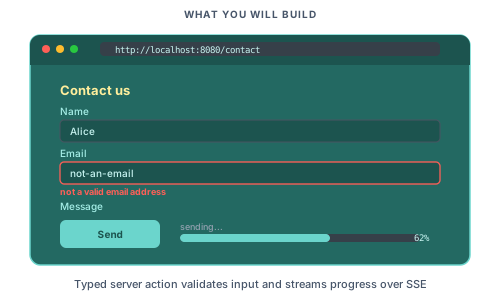
Run the server and submit with a malformed email (not-an-email). A red message appears under the email input. Submit with [email protected] and the same field shows the disposable-mailbox message. Submit with valid data and a green toast slides in reading "Message sent. We will reply shortly."
For the full list of validation and action-error constructors see errors reference.
Step 4: Add a streaming action
Create actions/task/process.go:
package task

import (
    "fmt"
    "time"

    "piko.sh/piko"
)

type ProcessInput struct {
    JobID string `json:"jobId" validate:"required"`
}

type ProcessResponse struct {
    Total int `json:"total"`
}

type ProcessAction struct {
    piko.ActionMetadata
}

func (a *ProcessAction) Call(input ProcessInput) (ProcessResponse, error) {
    return ProcessResponse{Total: 10}, nil
}

func (a *ProcessAction) StreamProgress(stream *piko.SSEStream) error {
    total := 10

    for i := 1; i <= total; i++ {
        if err := stream.Send("progress", map[string]any{
            "done":  i,
            "total": total,
            "label": fmt.Sprintf("Processing step %d of %d", i, total),
        }); err != nil {
            return err
        }

        select {
        case <-a.Ctx().Done():
            return a.Ctx().Err()
        case <-time.After(400 * time.Millisecond):
        }
    }

    return stream.SendComplete(ProcessResponse{Total: total})
}
Call is the entry point for normal (non-streaming) invocations. StreamProgress runs instead when the client opts into SSE via .withOnProgress(...).call(). Only one of the two methods runs per request. The action struct embeds piko.ActionMetadata, which gives us a.Ctx() for cancellation.
Run go run ./cmd/generator/main.go all again to pick up the new action.
For the full streaming signature, cancellation, and reconnection see how to streaming with SSE.
Step 5: Consume the stream on the client
Create components/pp-progress.pkc:
<template name="pp-progress">
    <div class="progress">
        <button p-if="state.status == 'idle'" p-on:click="start">
            Start
        </button>

        <div p-if="state.status == 'running' || state.status == 'done'">
            <progress :value="state.done" :max="state.total"></progress>
            <p>{{ state.label }}</p>
        </div>

        <p p-if="state.status == 'done'">Complete! Job: {{ state.jobId }}</p>
        <p p-if="state.status == 'error'" class="error">{{ state.error }}</p>
    </div>
</template>

<script lang="ts">
    const state = {
        status: 'idle' as 'idle' | 'running' | 'done' | 'error',
        done: 0 as number,
        total: 0 as number,
        label: '' as string,
        jobId: '' as string,
        error: '' as string,
    };

    async function start() {
        state.status = 'running';
        state.done = 0;
        state.label = 'Starting...';

        const jobId = crypto.randomUUID();
        try {
            const result = await action.task.Process({ jobId })
                .withOnProgress((data: unknown, eventType: string) => {
                    const event = data as { done: number; total: number; label: string };
                    state.done = event.done;
                    state.total = event.total;
                    state.label = event.label;
                })
                .call();

            state.status = 'done';
            state.jobId = jobId;
            state.total = result.total;
            state.done = result.total;
        } catch (err) {
            state.status = 'error';
            state.error = (err as Error).message;
        }
    }
</script>

<style>
    progress { width: 100%; height: 1rem; }
    .error { color: #b91c1c; }
</style>
Step 6: Drop the component on a page
Create pages/progress.pk:
<template>
    <piko:partial is="layout" :server.page_title="'Progress demo'">
        <h1>Progress demo</h1>
        <p>Click Start to begin a long-running task.</p>
        <pp-progress></pp-progress>
    </piko:partial>
</template>

<script type="application/x-go">
package main

import (
    "piko.sh/piko"
    layout "myapp/partials/layout.pk"
)

func Render(r *piko.RequestData, props piko.NoProps) (piko.NoResponse, piko.Metadata, error) {
    return piko.NoResponse{}, piko.Metadata{Title: "Progress demo"}, nil
}
</script>
Visit http://localhost:8080/progress and click Start. The progress bar advances in ten steps, one per time.After tick in the action. The label underneath updates with every step. When the run finishes, "Complete. Job: <uuid>" replaces the running label.
For the withOnProgress(...).call() builder see how to streaming with SSE.
Where to next
- Next tutorial: Shipping a real site assembles the pieces into a deployable project.
- Reference: Server actions reference, errors reference for the full validation/error constructors.
- Explanation: About the action protocol covers why actions use typed RPC instead of free-form HTTP handlers.
- How-to: Forms, streaming with SSE, rate limiting.
- Runnable source:
examples/scenarios/002_contact_form/andexamples/scenarios/010_progress_tracker/.